
If you manage a WordPress site, you've probably seen "WordPress XSS vulnerability" in a plugin changelog or a security notification and wondered what it actually means. Cross-site scripting comes up constantly in security conversations, but most explanations are either written for developers or so surface-level they're not useful.
XSS is the single most common vulnerability type in the WordPress ecosystem. It accounted for nearly half of all new vulnerabilities in 2024 and 34.7% of those reported in the first half of 2025. It's not an edge case. It's the dominant threat category.
The good news is that WordPress XSS is well-understood and preventable with the right infrastructure. The bad news is that most site owners don't have that infrastructure, and most advice about prevention either tells you to learn PHP or install a security plugin. Neither is a real answer.
This article explains what XSS is, why WordPress sites are especially exposed, and how layered protection eliminates the risk. It's part of our broader look at WordPress security threats, which maps the full threat landscape.
What WordPress Cross-Site Scripting Actually Is
Cross-site scripting (XSS) is a type of injection attack where malicious JavaScript gets inserted into your website's pages and executed in your visitors' browsers. Attackers can steal session data, redirect users, or capture credentials without the visitor ever knowing something is wrong. OWASP classifies it as one of the most critical web application security risks, and Patchstack's annual security reports have tracked it as the single largest vulnerability category in the WordPress ecosystem since 2024.
Most WordPress attacks target your server or your database. XSS is different. It targets your visitors.
The server itself may be fine. The database may be untouched. But every visitor who loads an affected page has their browser execute code that the attacker put there.
"The page loads just fine. The visitor has no idea there's malicious activity happening behind the scenes. That's what makes XSS dangerous."
The basic mechanics are straightforward. An attacker finds an input field that doesn't properly sanitize data, whether that's a comment form, a search box, a plugin settings field, or a URL parameter. They submit a JavaScript payload through that field. If the site stores or reflects that payload without cleaning it, the visitor's browser runs the attacker's code as though the site itself authored it.
That code can steal session cookies, redirect visitors to phishing pages, inject fake login forms, install keyloggers, or deface content. The visitor sees your site, trusts your site, and has no indication that anything is wrong.
This is what makes XSS different from attacks like SQL injection or brute force. Those target your infrastructure. Cross-site scripting weaponizes your visitors' trust.
The Three Types of WordPress XSS
Not all XSS works the same way, and the differences matter for understanding your risk.
Stored XSS: The Most Dangerous Variant
Stored XSS is the variant that should concern site owners the most. The attacker's malicious code gets saved to your database through a comment field, a plugin setting, a custom field, or any form that stores data. Once it's there, every visitor who views the affected page executes the script. No social engineering required. No tricking someone into clicking a link. The payload sits in the database and hits everyone who shows up.
It's also the hardest to detect because the malicious code lives in database records rather than in files. Standard file scanning won't find it.
A real-world example: LiteSpeed Cache, one of the most popular WordPress plugins with over 7 million installations, had a stored XSS vulnerability (CVE-2024-47374) where the plugin failed to sanitize an HTTP header value. Attackers could inject persistent JavaScript that executed for every visitor. This wasn't an obscure plugin from a random developer. It was a major, actively maintained plugin used by millions of sites.
Reflected XSS: Requires a Click
Reflected XSS works differently. The malicious payload is embedded in a crafted URL. When someone clicks that link, the server reflects the payload in the response without storing it. The script executes once, in that visitor's browser, during that session.
This requires social engineering, since someone actually has to click the malicious link. But links can be disguised through URL shorteners, email campaigns, or QR codes. A single click by an administrator is enough for an attacker to steal their session cookie and gain full admin access.
Reflected XSS is less dangerous than stored XSS at scale because it only affects one victim at a time. But it's still a serious vulnerability, especially when the target is someone with elevated privileges.
DOM-Based XSS: A Growing Concern
DOM-based XSS is the newest and least well-understood variant. The malicious payload never touches the server at all. Instead, client-side JavaScript on the page reads data from an attacker-controlled source, like a URL fragment, and inserts it into the page unsafely.
This is increasingly relevant in WordPress because the block editor and modern page builders ship substantial client-side JavaScript. Elementor, with over 10 million installations, has had DOM-based XSS disclosures where payloads were encoded in base64 JSON to bypass simple pattern matching.
DOM-based XSS is particularly tricky because the payload never appears in server logs and may not be caught by server-side WAF rules, since URL fragments aren't sent to the server. Detecting it requires auditing client-side JavaScript, not just PHP.
How the Three Types Compare
| Type | Persistence | Requires User Interaction | Detection Difficulty | Severity |
|---|---|---|---|---|
| Stored XSS | Permanent (saved in database) | No (triggers on page load) | Hard (invisible to visitors) | Critical |
| Reflected XSS | Temporary (in URL/request) | Yes (victim must click link) | Medium (URL looks suspicious) | High |
| DOM-based XSS | Temporary (client-side only) | Yes (victim must click link) | Very Hard (no server evidence) | High |

Why WordPress Sites Are Especially Exposed
XSS exists as a vulnerability class across all web platforms. But WordPress has a unique exposure problem, and it comes down to the plugin ecosystem.
"You don't have to be on anyone's threat list. You don't have to be a target. You don't have to be controversial. Your website can fall victim to a security attack even if you've never done anything to provoke one."
The Plugin Vulnerability Problem
WordPress core provides a solid set of functions to prevent XSS. Functions like esc_html(), esc_attr(), and wp_kses() are designed to sanitize output and neutralize injected scripts. But plugin developers don't use them consistently.
A complex plugin may have hundreds of output points. Missing proper escaping at a single point creates a vulnerability. The WordPress ecosystem has over 60,000 plugins maintained by developers with wildly varying skill levels and security awareness. Some are backed by multi-million dollar companies with dedicated security teams. Others are side projects maintained by a single developer.
The numbers reflect this reality. In 2024, 7,966 new vulnerabilities were discovered in the WordPress ecosystem, a 34% increase over the year before. XSS was the largest single category.
In the first half of 2025 alone, 6,700 new vulnerabilities were reported, and 58% were exploitable without any authentication. These figures come from the Patchstack 2025 State of WordPress Security report and their mid-year vulnerability report, which together represent the most thorough tracking of WordPress security disclosures available.
One-third of vulnerabilities disclosed in 2024 weren't patched before going public. Some appeared in abandoned plugins with thousands of active installations.
Authenticated vs. Unauthenticated: A Critical Distinction
Most XSS articles gloss over this, but it matters for understanding your actual risk.
Many WordPress XSS vulnerabilities require the attacker to have an existing account on your site, whether that's contributor, author, or even subscriber level. That's a real threat worth defending against, especially for sites with multiple user roles. But it's a different risk profile from unauthenticated XSS, where anyone on the internet can exploit the vulnerability without an account.
Unauthenticated stored XSS is the truly dangerous variant. No account needed, the payload persists in the database, and every visitor gets hit. When you see a vulnerability disclosure, the authentication requirement tells you a lot about how worried you should be.
Recent High-Profile Vulnerabilities
To put the scale in perspective, here are some notable XSS disclosures from the past two years:
| Plugin | Installations | CVE | Type |
|---|---|---|---|
| LiteSpeed Cache | 7M+ | CVE-2024-47374 | Stored XSS |
| LiteSpeed Cache | 5M+ (at time) | CVE-2023-40000 | Unauthenticated Stored XSS |
| Elementor | 10M+ | CVE-2024-5416 | XSS |
| Essential Addons for Elementor | 2M+ | CVE-2024-8440 | XSS |
| WP Rocket | 4M+ | 2025 disclosure | XSS |
| Ultimate Blocks | 100K+ | CVE-2025-1312 | Stored XSS |
LiteSpeed Cache alone has had at least four significant XSS disclosures between 2023 and 2025, including CVE-2023-40000, an unauthenticated stored XSS that affected over 5 million installations. This is a well-maintained plugin from an established company.
The pattern is clear: even trustworthy, popular plugins have recurring XSS issues. The vulnerability surface is simply too large for any single development team to catch everything.
What Attackers Actually Do With WordPress XSS
Understanding the consequences helps explain why WordPress XSS prevention deserves attention. The impact goes well beyond defacing your homepage.
Session Hijacking and Admin Takeover
The most immediate danger is session hijacking. When injected script steals an admin's session cookie, the attacker inherits that admin's full access to WordPress. They can create new admin accounts, install backdoors, modify content, export user data, and add plugins. All without ever cracking a password.
This is how XSS becomes a stepping stone to full site compromise. The initial vulnerability might be a single unsanitized input field in a minor plugin. The result is an attacker with persistent admin access and backdoors that survive even after the original vulnerability is patched.
Visitor-Facing Damage
XSS can redirect visitors to malware downloads or exploit kits, functioning as an entry point for redirect hacks. It can inject fake login forms that capture credentials. It can insert hidden SEO spam links that trigger Google penalties, similar to the pharma hack pattern. It can load cryptocurrency miners that consume visitor CPU resources or exfiltrate form data, including personal information and payment details, to external servers.
Business Impact
If Google detects injected malware or phishing on your site, it triggers a Safe Browsing warning: a full-screen red page that tells visitors the site is dangerous. Traffic drops immediately. Rebuilding your search rankings after a blacklisting takes months.
For sites that handle payments, an XSS vulnerability is a PCI compliance violation. For any site handling personal data, XSS-enabled data exfiltration is a breach under GDPR.
The window between disclosure and exploitation is shrinking. Patchstack's 2025 mid-year report found that 41.5% of reported vulnerabilities were exploitable in real-world conditions, up from 30.4% in the same period the prior year. Fastly has documented active exploitation campaigns targeting unauthenticated stored XSS in WordPress plugins. These aren't theoretical risks.

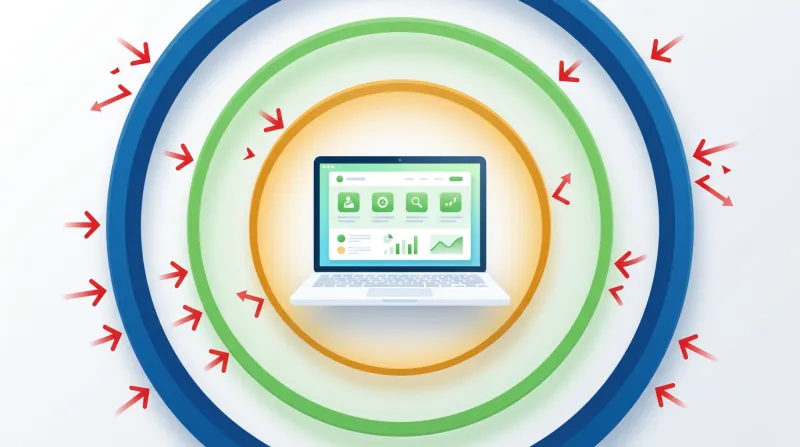
Three Layers of WordPress XSS Prevention
"FatLab writes secure code, but we can't control every plugin and theme developer. That's why we run a three-layer defense."
No single measure prevents all cross-site scripting. Effective WordPress XSS prevention requires layered defenses where each layer catches what the others miss.
Layer 1: WAF and Server-Level Scanning
A web application firewall inspects HTTP requests and blocks payloads that match known attack patterns before they ever reach WordPress. This is the first and most important layer because it stops XSS attempts at the network edge, before the vulnerable code even processes the input.
Cloudflare's managed rulesets include XSS detection rules that block common injection patterns: <script> tags, event handler injections like onerror=, javascript: URLs, and common encoding bypasses. The OWASP Core Ruleset provides additional generic XSS protection using anomaly scoring. WordPress-specific rules target known attack patterns against wp-admin, the REST API, and common plugin endpoints.
Between the WAF and the application code sits another critical component: Imunify360, which provides real-time malware scanning at the server level. If a malicious payload somehow gets past the firewall, Imunify360 catches it before it can execute or persist. It scans for known malware signatures and suspicious patterns in real time, acting as a safety net between network-edge filtering and the application itself.
What the WAF catches effectively: reflected XSS in URL parameters and query strings, known XSS payloads, common encoding bypasses, and attacks against known vulnerable plugin endpoints.
What the WAF may miss: DOM-based XSS (the payload never reaches the server), heavily obfuscated payloads, and stored XSS submitted through authenticated internal forms. This is exactly why server-level scanning with Imunify360 matters as a second checkpoint.
The WAF also buys critical time. When a new vulnerability is disclosed, Cloudflare often adds a signature within hours. That buys time to test and deploy the actual plugin update, which matters when the median time from disclosure to active exploitation is just five hours.
Layer 2: Timely Updates Close the Vulnerability Window
XSS vulnerabilities in plugins are typically patched quickly once reported. The real risk window is between disclosure and update. That's where most exploitation happens.
Timely plugin updates are the most important practical defense against WordPress XSS. Weekly updates mean 52 rounds of security patches per year. Monthly updates mean 12. That difference is significant when new vulnerabilities are being disclosed at a rate of roughly 190 per week.
We run automated updates across our fleet every week. When high-severity vulnerabilities are disclosed, we push updates outside the regular schedule. The goal is to keep that vulnerability window as small as possible.
The flip side is equally important: remove plugins you're not using. A deactivated plugin can still be exploitable through direct file access. If it's not active, it shouldn't be on the server.
Layer 3: Proper Code and Security Headers
The application-level defense against XSS is proper sanitization and output escaping. WordPress provides the functions. The challenge is that we can't control whether every plugin developer uses them.
For the code we write, we follow WordPress's security model: sanitize inputs when they're received and escape outputs at the exact point they're rendered to the browser. For third-party code, we rely on the first two layers as insurance.
Content Security Policy (CSP) headers add another browser-level defense. CSP instructs the browser to only execute scripts from explicitly trusted sources. Even if an XSS payload is injected into the page, a properly configured CSP can prevent the browser from running it.
CSP is extremely effective in theory, but difficult to implement on WordPress sites. Core, themes, and plugins all use inline script tags, and a strict CSP that blocks inline scripts would break most WordPress sites. Getting CSP right requires per-site tuning because every site has different plugins, themes, and third-party integrations. It's the kind of work that only makes sense in a managed hosting context, where someone maintains the configuration over time.
What Site Owners Should Actually Do About WordPress XSS
Most WordPress XSS prevention advice assumes you're a developer who can audit plugin source code. That's not realistic for most site owners. Here's what actually matters at the operational level.
Keep Plugins Updated and Curated
This is the single most impactful thing you can do. WordPress XSS vulnerabilities get patched. The question is whether the patch reaches your site before an attacker reaches the vulnerability.
Update plugins at least weekly. Remove anything you're not actively using. Prefer plugins from established developers with security track records, high installation counts, and recent update activity. Be wary of plugins that haven't been updated in six months or longer.
"The real risk isn't that a vulnerability might exist. The real risk is that there may be no one to patch it when one is discovered."
Make Sure You're Behind a WAF
A DNS-level web application firewall isn't optional for any site that takes security seriously. Plugin-level security tools have their place, but they can't match the protection of a WAF that filters traffic before it reaches your server.
Don't Overlook Backups
When the next unknown vulnerability surfaces and no WAF rule covers it, backups are the last line of defense. A clean, recent backup means you can recover quickly rather than rebuild from scratch. Daily automated backups, stored off-server, turn a potential catastrophe into a manageable recovery.
Monitor for Signs of Compromise
Stored XSS attacks can be subtle. Watch for unexpected redirects reported by visitors, unusual admin accounts you didn't create, Google Search Console security warnings, or sudden drops in search traffic. If any of these appear, get professional help immediately. Stored XSS payloads in the database aren't something you want to clean up manually.
Know When Professional Management Makes Sense
For organizations without dedicated technical staff, managing WordPress XSS risk comes down to whether you have the infrastructure and processes to keep up with the pace of vulnerability disclosures. At roughly 190 new WordPress vulnerabilities per week, staying current is an operational commitment, not a one-time setup.
For organizations managing multiple WordPress sites, the complexity multiplies. Each site has its own plugin stack, WAF configuration, and update schedule. Fleet-level security requires systematic approaches: centralized WAF policies, automated update deployment, and consistent plugin vetting across every site.
If your organization needs that level of coverage, our WordPress security services are built for it. You can also see what professional security management covers.