
Most organizations think about WordPress security in one of two ways. Either they assume their site is too small and too boring to attract attention, or they assume that installing a security plugin checks the box. Both assumptions are wrong, and both leave sites exposed to automated bots that don't care how small you are.
"You don't have to be on anyone's threat list. You don't have to be a target. You don't have to be controversial. Your website can fall victim to a security attack even if you've never done anything controversial at all."
We manage security for roughly 200 WordPress sites, including political organizations targeted by state-level actors. That experience has shaped how we think about WordPress security threats: not as a single problem to solve with a single tool, but as a shifting set of risks that requires understanding before you can defend against them.
This article maps those risks. It covers what common WordPress attacks look like, why WordPress gets targeted, what the real costs are, and how the defense layers fit together. Each major threat type links to a deeper dive for the full picture.
Why WordPress Is a Target for Hackers

WordPress powers over 42% of all websites on the internet. That market dominance makes it the most efficient target for automated attacks. Attackers build one exploit and can hit millions of sites. A single vulnerability in a popular plugin with 100,000+ installations gives attackers a massive attack surface from a single discovery.
Being popular does not mean being insecure, though. WordPress core is remarkably stable. The vulnerability distribution tells the real story:
| Component | Share of Vulnerabilities | 2025 Count |
|---|---|---|
| Plugins | 96% | ~10,880 |
| Themes | ~4% | ~450 |
| WordPress Core | <1% | 6 |
When someone says "WordPress got hacked," it's almost never a core vulnerability. It's a plugin, a theme, or a misconfiguration.
The real issue is the ecosystem. The average WordPress site runs 20+ plugins and a theme, each maintained by different developers with different security practices. Over 11,300 new plugin vulnerabilities were discovered in 2025 alone, a 42% increase over the prior year.
That's roughly 31 new vulnerabilities per day.

The Scale of the Problem
These numbers are worth understanding because they reframe how you think about protection.
- 90,000 attacks per minute against WordPress sites globally
- 13,000 WordPress sites hacked per day, approximately 4.7 million per year
- 97% of attacks are automated, not humans targeting specific sites
But the most important number is the shrinking window between vulnerability disclosure and active exploitation:
| Time After Disclosure | % of Exploits Active |
|---|---|
| 6 hours | 20% |
| 24 hours | 45% |
| 7 days | 70% |
The weighted median time from disclosure to active exploitation is just 5 hours. Traditional monthly update cycles aren't fast enough. By the time most site owners read about a vulnerability, automated exploits are already scanning for it.
Automated vs. Targeted: What You're Defending Against
About 97% of the attacks we see are automated. The other 3% are targeted. That distinction changes how you think about protection.
Automated Attacks
The vast majority of WordPress security threats come from bots scanning the internet for known vulnerabilities. These bots don't evaluate whether a site is "worth" attacking. They scan IP ranges and known WordPress paths for any site running a vulnerable plugin version, using a weak password, or exposing a login page.
The bots are looking for different things depending on their purpose: injecting pharmaceutical spam, building bot armies, stealing information, or simply causing chaos. A small nonprofit blog running an outdated plugin is just as scannable as a Fortune 500 site.
This is where the "I'm too small to be a target" myth falls apart. Attackers don't want your content. They want your infrastructure. A hacked small business site is valuable as a phishing host, an SEO spam platform, a malware distribution point, or a node in a botnet.
Targeted Attacks
Targeted attacks are rare but devastating. In our experience, they come from involvement with controversial subjects, politicians, or organizations that generate strong emotions.
We've fought bots from China, Russia, and Egypt targeting our political clients. The most serious case involved a political action committee. Attackers specifically targeted the donations page, not the whole site, a few weeks before a major national election. The goal was to stop the organization from collecting donations during the final push. The FBI got involved because it was considered a direct threat against the democratic process.
That's the extreme end. But it illustrates why organizations with any kind of public profile need to take security seriously, not just technically but operationally.

How WordPress Sites Get Hacked
There's no single way WordPress sites get compromised. Common WordPress attacks fall into several categories, each requiring a different defensive approach.
- Credential attacks - Brute force, credential stuffing, and password spraying against login pages
- Code injection - SQL injection, cross-site scripting (XSS), and remote code execution through vulnerable plugins
- Supply chain attacks - Compromised or abandoned plugins that introduce vulnerabilities with no one to patch them
- Malware and backdoors - Persistent footholds installed after initial compromise, including SEO spam and redirect hacks
- Infrastructure attacks - DDoS, resource abuse, spam registrations, and credit card testing
Credential Attacks
Brute force attacks are among the oldest and most common WordPress security risks. Automated bots hammer the login page with username and password combinations, hoping to crack their way in.
In our experience, brute-force attacks haven't successfully gained admin access in about 15 years, at least not on sites with reasonable password policies. But brute force still works as a denial-of-service vector. The volume of login attempts can overwhelm a server even without cracking a single password.
Brute force is often preceded by user enumeration, where attackers scan WordPress's default author profiles to collect usernames. WordPress hands this information over for free, since author URL slugs match actual usernames. Once they have your usernames, they move on to password attacks. The reconnaissance-to-attack pipeline is straightforward and largely automated.
The strongest answer to stolen or guessed passwords is two-factor authentication. Even an attacker who has the right password can't finish logging in without the second factor.
Code Injection
Code injection attacks exploit vulnerabilities in plugin or theme code to insert malicious queries or scripts.
SQL injection is when attackers insert code through URLs or forms that manipulates database queries. Imagine a search form on a membership site that is modified to return not search results but all personal information to the attacker. Or worse, it deletes database tables. SQL injection was the dominant threat early in my career, and it's still dangerous. The fix is well-understood (sanitized database queries), but we can't control what every plugin developer does.
Cross-site scripting (XSS) is the most common vulnerability type in the WordPress ecosystem, accounting for roughly 35% of all discovered vulnerabilities. Attackers insert malicious scripts into input fields such as comments, forms, or search boxes. Those scripts run invisibly when visitors load the page. The page looks fine. The visitor has no idea there's nefarious activity happening behind the scenes: stealing cookies, capturing login credentials, or redirecting to malicious sites.
Both are preventable through proper coding practices, but in an ecosystem with thousands of plugin developers, code quality is uneven. That's why defensive layers beyond the application itself matter.
Supply Chain Attacks
Compromised WordPress plugins represent a growing threat category. The risk isn't just that a vulnerability might exist in a plugin. The risk is that there may be no one to patch it when a vulnerability is discovered.
Major plugin providers like ACF, Divi, and Gravity Forms run multi-million dollar businesses with dedicated security teams. A random plugin from GitHub or ThemeForest has no such assurance. When we go into a website we're taking over and see plugins we've never heard of from companies we've never heard of, we are immediately wary.
Our evaluation is straightforward: Is the plugin widely used and highly rated? Does it have thousands or millions of active installations? Does an established company back it? When was it last updated? Six months without an update is a security red flag. One-third of plugin developers are unreachable or unresponsive to vulnerability reports, and 35% of vulnerabilities disclosed in 2024 remained unpatched as of early 2025.
Malware and Backdoors
Once attackers gain access through any of these vectors, they install persistent footholds. According to Sucuri's remediation data, 72.7% of infected sites contain malware, 49.2% have at least one backdoor, and 42.2% have SEO spam injections. These numbers show just how thoroughly a hacked WordPress site gets compromised.
These aren't isolated incidents, either. The Balada Injector campaign alone was responsible for 149,351 detected infections in 2024. It injects obfuscated JavaScript that redirects visitors through multi-stage chains and installs counterfeit WordPress plugins as persistent backdoors. Campaigns like this operate at an industrial scale, hitting sites based on whether they're vulnerable, not whether they're valuable.
Pharma hacks inject pharmaceutical advertisements into your site's content and search results. Redirect hacks send your visitors to malicious websites. Both are often invisible to the site owner because the injected content is designed to appear only to search engines or new visitors, not to logged-in administrators.
We have zero redirect attacks and zero pharma attacks in FatLab's history. I attribute that directly to our mandatory WAF policy. These are relatively easy attacks to protect against as long as you have the right tools in place.
The critical thing about infections is that they're self-replicating. They compromise both files and the database. A partial cleanup means the infection reinfects itself from the pieces you missed. Backdoors come in multiple forms: injected code creating programmatic reinfection points, fake admin accounts, and hidden files in directories you'd never think to check.
"To think that you're going to clean up a hack as a human, scanning files one by one, is a gamble. The tools that companies like Sucuri have built are specifically designed to find every piece of an infection. That's not something you can replicate manually."
This is why professional cleanup services like Sucuri exist, and why we recommend them over manual remediation.
Infrastructure Attacks
DDoS attacks target the server infrastructure itself rather than the WordPress application. Historically, DDoS was a pure volume game: hammer a site until it crashes. Today, Cloudflare stops 99.9% of traditional volumetric DDoS. Global DDoS attacks doubled in 2025 to 47.1 million total, but the technology to absorb them has kept pace.
What still gets through is low-and-slow DDoS. Attackers use pools of IP addresses spread across countries and hit targets a few times per minute rather than thousands. This doesn't trigger WAF rate-limiting thresholds but still degrades the site over time.
Spam registrations are a related infrastructure threat that starts as a nuisance and becomes devastating. They bloat databases, consume processing power, and at scale can take sites down entirely. Slower spam registrations are actually more dangerous than fast ones. Fast registrations trigger rate limiting. Slow ones, deliberately throttled by sophisticated attackers, slip through.
There's also a credit card testing variant we see on political and membership sites. Attackers run stolen card numbers through donation or membership forms. You'll see small, odd amounts from Gmail accounts. That means an attack is in progress and requires both firewall- and software-level mitigation.
What It Costs When WordPress Gets Hacked
The emotional toll is real and overlooked. Even when a hacked WordPress site is a simple brochure with no personally identifiable information, the owner feels violated and scared. "What did they steal?" is the first question, even when nothing was taken.
The business impact ranges from minor to catastrophic depending on the organization:
- Small business: Pharma ads, brief downtime, embarrassment, plus $300-$1,500+ in professional cleanup costs
- Membership organization: Reputational damage within the industry they serve
- Political PAC: Potentially millions in lost donations during a critical election period
The impact that hits everyone is Google's blacklisting. All the investment you've made in organic search rankings gets wiped out. Google flags up to 70,000 websites per day for malware or phishing, and the recovery timeline is not quick. Rebuilding takes months of effort.

"It's not a wait-and-see game where you clean up afterwards. It's a multi-layer approach to keeping it from happening in the first place. And then if it does happen, acting insanely fast so you don't end up blacklisted."
The Layered Defense Model
"Security is not an option. It's non-negotiable. All public websites we host must be behind Cloudflare Enterprise WAF. Clients who push back are overruled on this point. We don't make exceptions."
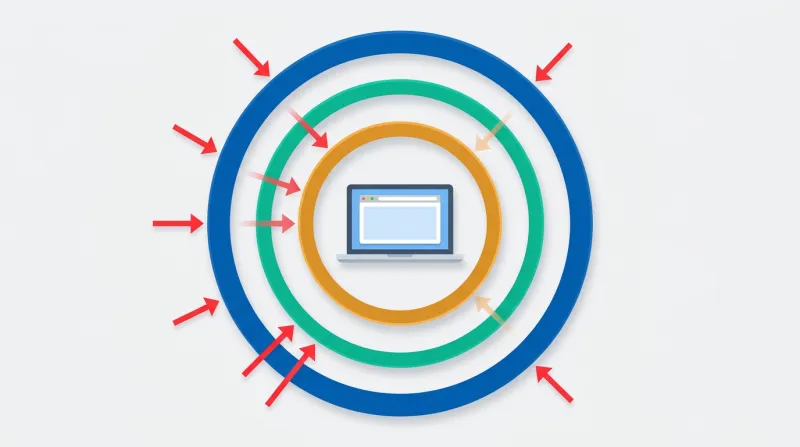
Security is not a single tool. It's a stack of layers, each catching what the others miss:
| Attack Type | Edge Catches | Server Catches | Application Catches |
|---|---|---|---|
| DDoS | Yes | Partially | No |
| Brute force | Yes (rate limit) | Yes (Fail2ban) | Yes (lockout) |
| Known CVE exploit | Yes (WAF rules) | Yes (server WAF) | Yes (patching) |
| Zero-day exploit | Maybe (heuristics) | Maybe (behavior) | No (unpatched) |
| Stolen credentials | No | No | Yes (2FA) |
| Malware post-infection | No | Yes (scanning) | Yes (monitoring) |
| Supply chain attack | No | No | Partially |
Edge Protection
The first layer stops attacks before they reach your server. A DNS-level web application firewall like Cloudflare filters all traffic at the CDN/proxy level, blocking known attack patterns, malicious IPs, bot signatures, and DDoS traffic. This is non-negotiable for us. We don't allow any site on our servers where traffic isn't going through Cloudflare Enterprise WAF.
Traditional hosting defenses block only 12-26% of attacks targeting known exploited vulnerabilities. Edge-layer WAFs with real-time threat intelligence perform dramatically better, which is why we treat this layer as mandatory.
Edge protection also provides virtual patching. The WAF can block exploitation of known vulnerabilities before a software patch is even released. Given that the median time to first exploitation is five hours after disclosure, this capability closes a critical window.
Server-Level Security
The second layer hardens the hosting environment itself. Imunify360 provides real-time malware scanning and cleanup at the server level, catching anything that gets past the firewall. This includes file integrity monitoring, PHP hardening, and process isolation to prevent cross-site contamination.
Application Security
The third layer is the WordPress application itself. This means timely updates (the single most impactful security measure), strong authentication, the principle of least privilege for user accounts, and removing unused plugins entirely rather than just deactivating them.
We cover the application-level tool landscape in depth in our WordPress security plugins hub, including where plugins fit versus where server-level security takes over.
Operational Security
The fourth layer is ongoing operations: daily backups, continuous monitoring, and incident response capability. Backups are often not considered part of security, but they should be. They're the last line of defense against the unknown next vulnerability, the one nobody has seen yet. 24/7 monitoring catches what automation misses: unexpected admin accounts, unusual file changes, or traffic patterns that indicate an attack in progress.
"Anyone who's guaranteeing you 100% security is a fool. What we guarantee is that we have the best tools, practices, and services in place, plus rapid response and recovery."
How WordPress Security Threats Have Evolved
Early in my career, SQL injection was the dominant threat. There were no web application firewalls. Hardware firewalls cost thousands of dollars per month. One poorly written SQL statement was all it took.
Volumetric DDoS attacks dominated the middle era. Bots would hammer a site until the server crashed. Before WAFs existed, the only response was to shut down the PHP application entirely and wait out the attack. You'd take your site offline because there was nothing else you could do.
Today, the tools we have to fight these threats have grown substantially. Cloudflare stops the volumetric attacks. Imunify360 catches malware at the server level. Automated update systems patch vulnerabilities within hours of disclosure. The arms race continues, but the defensive side has gotten much stronger.
The threats that worry us now are the ones that bypass traditional defenses: low-and-slow attacks, supply chain compromises through abandoned plugins, credit card testing on donation forms, and the persistent challenge of human error. A hack today is just as likely to start with someone installing an unknown plugin or clicking Update All at the worst possible time.
When Professional Security Management Makes Sense
Security is not a one-time setup. It's an ongoing operational concern that requires monitoring, patching, and the ability to respond when something gets through. The question isn't whether you need security. It's whether you have the infrastructure and expertise to maintain it continuously.
For organizations without dedicated technical staff, especially nonprofits, associations, and advocacy organizations, the math usually favors professional management. The alternative is taking on responsibility for staying current with 31 new vulnerabilities per day, responding to incidents at all hours, and maintaining a multi-layer security stack that most site owners don't know exists. Without that level of attention, it's only a matter of time before a site gets compromised.
If you're evaluating your options, our WordPress security services page explains what's included, and our guide to professional security management covers how that differs from what typical hosting providers handle.