
For advocacy organizations, the email list is the single most valuable digital asset you own. It outlasts social media followers, is more reliable than organic search traffic, and is the only channel that lets you mobilize thousands of supporters within hours when a bill hits a committee or a policy window opens. Building that list starts with a deliberate architecture decision on your WordPress site, not a sidebar widget added as an afterthought.
There's a phrase we use when describing what it feels like to manage advocacy sites: you are planning to be reactionary. The capture forms, the platform integrations, and the delivery infrastructure all have to be in place before the moment arrives, because the moment never announces itself.
A national advocacy organization we've managed for nearly two decades regularly sees traffic spikes driven by television appearances, congressional hearings, and mass email campaigns. Donations may surge for just five to ten minutes after a TV spot. Every form, every integration, every data flow has to work during those minutes. You cannot build this architecture reactively.
Social media algorithms decide who sees your posts. Google can reshape your organic traffic overnight with a single update. But your email list belongs to you. No platform can take it away, throttle it, or change the terms of access. When a legislative moment arrives, and you need 5,000 people to call their representatives by the end of the day, email is the only owned channel that delivers reliably.
The M+R Benchmarks 2025 report found that nonprofits raised an average of $2.63 in email-sourced revenue per subscriber, with email accounting for 11% of total online revenue. For advocacy organizations that also fundraise, the list serves double duty: a mobilization engine and a revenue source. But the real value is mobilization capacity—the ability to turn attention into action at the moment it matters most.
After years of managing email integrations for political campaigns and advocacy groups (collecting contact data from voter files, canvassing, events, and website forms all at once), this is the principle we always come back to:
A scattered list is chaos. The website feeds the platform. It is never the source of email sends. That's a recipe for blacklisting.
This article covers how to architect your WordPress advocacy site to systematically build, segment, and maintain an email list that mobilizes people when it counts.
The Website Is a Collection Point, Not an Email Server
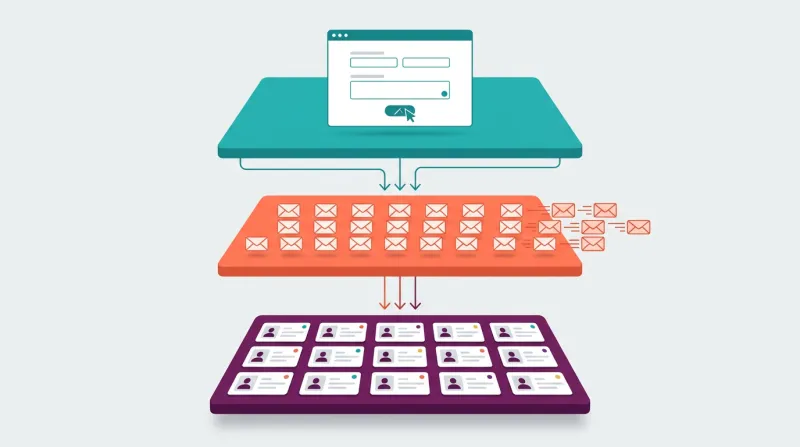
This is the principle that shapes everything else. Your WordPress site exists to capture email addresses and feed them into a dedicated email platform. It should never be the system sending those emails.
Advocacy organizations collect contact information from a variety of sources: on-the-street canvassing, voter files, party-provided lists, event signups, and website forms. All of that data has to converge in a single platform, whether that's Mailchimp, Action Network, ActiveCampaign, or another provider built for mass delivery. A list scattered across multiple systems becomes chaos when you need to mobilize quickly.
We always ask which platform the organization plans to use, then build the WordPress integration around it. The website captures the data. The platform sends the email.
In nearly two decades of managing advocacy sites, we've seen what happens when organizations try to turn WordPress into an email delivery system: blacklisting and non-delivery, especially with the burst-sending patterns that advocacy work demands. When you need to reach your full list within hours, that volume has to come from infrastructure designed for it.
The architecture looks like this:
- WordPress handles capture. Petition forms, signup forms, donation forms, event registration, and content upgrades.
- Email platform handles delivery. List management, automation sequences, segmentation, A/B testing, and action alerts.
- CRM or database (if applicable) handles the supporter record. Action history, donation history, engagement scoring.
Smaller organizations with fewer than 5,000 contacts can usually get by with the email platform doubling as the CRM. Mailchimp or Constant Contact handles both list management and basic contact records.
Mid-size organizations in the 5,000-50,000 range typically need a dedicated advocacy platform, such as Action Network, alongside WordPress.
Large organizations with over 50,000 contacts usually run systems like EveryAction or NationBuilder that combine email, CRM, and action management into a single platform.
The point is that WordPress occupies one specific layer: capture. Getting that layer right is what this article is about.
Where Email Addresses Come From on an Advocacy Site

Generic list-building advice tells you to add a newsletter signup widget and call it done. Advocacy organizations are different. Your WordPress site has at least five distinct capture points, each with a different subscriber intent and segmentation value.
Petitions as a List-Building Engine
Petitions are the highest-converting list-building tool advocacy organizations have. They combine genuine issue interest with a natural reason to provide an email address.
The petition-to-subscriber pipeline is where most organizations leave value on the table. A supporter signs a petition, and the email address lands in a general list with no segmentation, no welcome sequence, and no connection to the issue that drove the signup.
What the architecture should look like:
- Supporter finds the petition through social media, email forwarding, search, or the WordPress site directly
- Signs with name, email, and ideally zip code
- The opt-in checkbox for ongoing communications is included but unchecked by default (pre-checked opt-ins damage trust and violate regulations in some jurisdictions)
- Submission triggers a welcome email that arrives within minutes, acknowledging the specific petition signed
- The supporter enters a segmented list based on the petition topic
- The confirmation page immediately offers a share action, which multiplies list growth virally
The petition data itself (which issue, when signed, referring source) becomes valuable segmentation intelligence. A supporter who signed a climate petition gets a different follow-up than one who signed a housing petition. That segmentation starts at the moment of capture, not later.
For the WordPress implementation, this typically means petition and action alert plugins that connect to the email platform via native integrations, Zapier, or custom API work. Gravity Forms with email platform add-ons is the most flexible option we've worked with. Action Network's official WordPress plugin is the most common choice for progressive advocacy organizations.
One warning: Change.org petitions give you visibility, but you don't own the email relationship. If list ownership matters to your organization (and it should), the petition needs to live on your site or on a platform you control.
Action Alert Signups
Action alerts are the advocacy-specific version of a newsletter signup, but with a crucial difference: supporters sign up not just to receive information but to be told when to act. That intent makes these signups more valuable than generic newsletter subscribers.
The copy matters here. "Subscribe to our newsletter" converts poorly compared to specific, action-oriented language:
- "Get action alerts when climate legislation moves" ties the signup to specific, tangible value
- "Join 12,000 advocates fighting for affordable housing" adds social proof and mission alignment
- "We'll email you when your legislators vote on healthcare" creates urgency and specificity
Allowing supporters to choose which issues they want alerts for improves engagement and reduces unsubscribes. A single checkbox list of issue areas on the signup form enables segmentation from day one.
Effective placement on the WordPress site includes:
- Sidebar widgets on issue pages
- End-of-article CTAs on blog posts about current legislation
- A dedicated action center page with topic-specific options
- A persistent but dismissible bottom bar across the site
Content Upgrades and Lead Magnets
Content upgrades (offering a downloadable resource in exchange for an email address) work for advocacy organizations, but they require different framing than commercial lead magnets.
What converts for advocacy audiences:
- Issue briefing documents: "Download our complete analysis of the proposed housing legislation" is substantive enough to be worth an email address
- Toolkit or action guide: "Advocacy Toolkit: How to Contact Your Representative About Climate Policy" is directly useful for the supporter's advocacy goals
- Legislative tracker or scorecard: "Download the 2026 Legislative Scorecard" provides high-value, issue-specific information that supporters genuinely want
- Research reports: Original research or data analysis on issues the organization covers
The WordPress implementation uses form plugins with conditional logic to deliver the download link after submission. Gravity Forms or WPForms with email platform integration handles this cleanly.
Event Registration
Events, whether in-person town halls, virtual meetings, or webinars, naturally collect email addresses through registration. The event-to-list pipeline matters:
- Event promoted on WordPress site, social media, and existing email list
- Registration form collects name, email, zip code, and issue interests
- Registration confirmation email begins the relationship
- Post-event follow-up thanks attendees and invites ongoing engagement
- Non-attendees receive a "sorry we missed you" email with an event recap and invitation to future events
The key is treating event registration as a list-building touchpoint, not just an event logistics step. Every registrant who opts in is a new subscriber with demonstrated interest in the issue.
Donation Follow-Up
Every donation transaction is a list-building opportunity. Donors have demonstrated the highest possible level of commitment by giving money. The donation confirmation email should welcome them into the email community, not just send a receipt.
The principle here: never automatically add donors to the general email list without consent. This damages trust and triggers spam complaints. Always use an explicit opt-in checkbox on the donation form, unchecked by default.
GiveWP integrates with Mailchimp, Constant Contact, and other platforms through add-ons that place the opt-in checkbox directly in the form builder. WP Fusion provides CRM integration with automatic tagging based on donation amount and frequency.
The Integration Architecture That Nobody Else Explains
This is where most content on the topic stops. It tells you to add signup forms and pick an email platform. What gets skipped is the integration architecture that connects your WordPress capture points to your email platform and, if applicable, your CRM.
WordPress Form-to-Platform Connections
The form plugin you choose determines what integrations are available natively:
- Gravity Forms and WPForms both offer direct add-ons for Mailchimp, ActiveCampaign, and Constant Contact
- Fluent Forms has these integrations built in without requiring separate purchases
- Contact Form 7 connects through third-party plugins, including a dedicated Action Network integration plugin specifically built for advocacy organizations
For platforms without native WordPress integrations, Zapier serves as the middleware. A typical advocacy workflow: a WordPress form submission triggers adding the contact to a specific list in the email platform, tagging them by the source form, and kicking off a welcome automation sequence. This works reliably, though it adds a monthly cost and a dependency on a third-party service.
Action Network Integration on WordPress
Action Network deserves its own section because it's the most common advocacy-specific email platform, and its WordPress integration options are more developed than most.
The official WordPress plugin (wp-action-network) embeds Action Network forms, petitions, events, and fundraising pages directly into WordPress. It creates signup widgets that work without JavaScript embeds, which matters for performance. You can place lightweight signup forms on every page while loading full embed codes only on dedicated action pages.
A dedicated Contact Form 7 integration plugin maps CF7 form fields directly to Action Network's person data structure. This is designed specifically for nonprofits, advocacy groups, and political campaigns.
For organizations that need more control, Action Network provides a full-featured API that allows custom form submissions, conditional list assignment, and real-time data sync between WordPress and the platform. This requires development work but provides complete control over the data flow.
The Three-Way Data Flow
For organizations running a CRM alongside their email platform, the data flow looks like this:
The WordPress form submission goes to the email platform (adding the contact to a list with tags), which then syncs to the CRM (creating or updating the supporter record with source attribution and action history).
Getting this right means a petition signer doesn't just land on a generic email list. Their CRM record shows which petition they signed, when, where they came from, whether they've attended events or donated, and their engagement score. That record drives the segmentation that makes advocacy email effective.
There's a principle we come back to constantly: data in, data out. Organizations dream up great features (dynamic supporter maps, engagement-based email tiers, issue-specific nurture sequences), but they haven't built the capture layer to collect the data those features require.
You want sophisticated segmentation? Then your WordPress forms need to collect the right fields, tag correctly at the source, and sync cleanly to the platform that will use them. The vision is only as good as the data flowing into it.
Data in, data out. If you give me the data, I can make it come out however you want. But you need the data.
The common failure point is deduplication. When contacts enter through multiple WordPress forms, event systems, donation platforms, and offline data imports, duplicates proliferate. The email platform or CRM needs to handle deduplication based on email address as the primary key. Most advocacy platforms handle this natively. If you're using a general-purpose email platform like Mailchimp, you'll need workflows or middleware to manage deduplication across sources.
Choosing an Email Platform for Advocacy Work
What advocacy organizations need from an email platform is fundamentally different from what an e-commerce store or a general nonprofit needs. The factors below are the ones that matter most for advocacy work specifically.
What Advocacy Organizations Need That General Platforms Don't Provide
Action alert speed: When a bill moves, you need to draft, segment, and send within hours. Platforms that require multi-step approval workflows or batch scheduling can't keep up.
Legislative district targeting: The ability to segment by zip code or legislative district so supporters only receive alerts relevant to their representatives. This is the feature that separates purpose-built platforms from general email tools.
Petition and action management: Collecting petition signatures that flow directly into your email list without manual export and import steps.
Political content deliverability: Advocacy emails face stricter spam-filter scrutiny than commercial emails. Gmail's Promotions tab frequently captures advocacy content. Platforms like Action Network have invested in building sender reputation specifically for political and advocacy messaging.
For a full comparison of email platforms (pricing, automation features, and nonprofit discount programs), see our guides on email marketing for WordPress and email marketing for nonprofits. What matters here is the advocacy-specific shortlist:
- Action Network for organizations that need petition-to-email conversion and action management baked in
- ActiveCampaign for organizations with complex automation needs and the technical capacity to build sophisticated sequences
- Mailchimp or Constant Contact as starting points for smaller organizations under 5,000 contacts, where simplicity matters more than advocacy-specific features
For organizations considering all-in-one platforms like NationBuilder, here's the honest trade-off: NationBuilder includes its own website builder, which typically means not using WordPress. For organizations that need deep website customization, multiple external integrations, and full data ownership, WordPress, paired with a dedicated email platform, is the stronger architecture.
Opt-In Forms: What Converts for Advocacy Audiences
Conversion rates vary significantly by form type:
- Fullscreen popups: 3.41%
- Modal popups: 2.95%
- Sidebar widgets: 2.61%
- Inline forms: 0.58%
Popups convert three to five times better than inline forms.
But advocacy organizations have to balance conversion optimization with supporter experience. An aggressive pop-up on an action page frustrates supporters trying to complete a petition or contact their legislator. The pop-up ends up competing with the action you actually want them to take.
A Recommended Multi-Form Approach
The approach we recommend for advocacy sites on WordPress:
- Exit-intent popup on blog and content pages only, never on action or donation pages
- Inline signup form at the end of every blog post
- Persistent bottom bar across the site, dismissible
- Sidebar widget on relevant issue pages
This balances list growth with user experience. The highest-value pages (petitions and donations) stay clean. Content pages, where supporters are in learning mode, carry the load for list building.
Form Fields: The Zip Code Question
For most list-building advice, the answer is simple: fewer fields equal higher conversion. An email address only is the minimum viable form.
For advocacy organizations, zip code changes the equation. It enables legislative district matching, state-level campaign targeting, and local event invitations. It's arguably more important than the first name for advocacy segmentation.
The trade-off is real: adding a zip code field reduces signup conversion rates. But a list of 10,000 supporters you can target by legislative district is more valuable than a list of 15,000 you can't.
Our recommendation for an advocacy-enhanced signup form:
- Email address (required)
- First name (optional)
- Zip code (strongly encouraged, framed as "so we can connect you with your local representatives")
- Issue interests (checkbox, optional, enables segmentation from day one)
Copy That Converts
Generic signup copy underperforms for advocacy audiences. "Subscribe to our newsletter" makes the organization sound like a content publisher rather than a mobilization platform.
Copy patterns that convert:
- "Get action alerts when [specific issue] legislation moves."
- "Join [X,000] advocates fighting for [cause]."
- "Be the first to know when your legislators vote on [issue]."
What these have in common: specificity, action orientation, and a clear promise of what the subscriber will receive and when.
Segmentation from Day One
Most email list content treats segmentation as something you do after the list is built. For advocacy organizations, segmentation needs to happen at the moment of capture.
Segment by Source
Every capture point on your WordPress site should tag the subscriber with their source:
- Petition signers tagged with the specific petition and issue area
- Action alert signups tagged with their selected issue interests
- Event registrants tagged with the event type and topic
- Content download subscribers tagged with the resource topic
- Donors tagged with a donation amount range and campaign
This source data drives the welcome sequence, the ongoing content they receive, and the asks you make. A petition signer who has never donated gets different messaging than a recurring donor who also signs petitions.
The Ladder of Engagement

The most important segmentation concept for advocacy is the ladder of engagement: progressively moving supporters from passive awareness to active participation. VoterVoice's analysis of 559 million advocacy emails across 28,000 campaigns found a 41.7% open rate and a 6.8% action rate. Those numbers show what a well-segmented list can achieve when the right message reaches the right tier:
- Level 1 (Subscriber): On the list, minimal engagement
- Level 2 (Engaged): Opens emails, clicks links
- Level 3 (Digital advocate): Signs petitions, shares content
- Level 4 (Active advocate): Calls legislators, attends events
- Level 5 (Champion): Hosts events, recruits others, testifies
The email strategy should match the level. Subscribers at level 1 get re-engagement content and low-barrier asks. Level 2 supporters receive issue education and opportunities to petition. At level 3, the asks escalate: call your representative and attend a town hall. Levels 4 and 5 get leadership opportunities, insider briefings, and testimony preparation.
The WordPress capture layer feeds this by tracking which actions each supporter has taken. When a petition form submission updates the supporter's record in the email platform, their engagement score increases, and they automatically move into the next tier's messaging.
Welcome Series: The Most Important Automation
The welcome series is where you convert new subscribers into engaged advocates. Engagement from subscribers who receive welcome emails is 33% higher than from those who don't receive them.
For advocacy organizations, the welcome series should lead with advocacy, not fundraising. If someone signed up through a petition, respect that intent.
A recommended five-email sequence over 14 days:
- Immediate: Confirmation and thank you, acknowledging the specific action that triggered signup, setting frequency expectations, including one easy action (share with a friend)
- Day 2: Organization story and impact, with concrete statistics ("last year, our advocates made 50,000 calls to legislators")
- Day 5: Deep dive on the issue most relevant to how they signed up, with a low-barrier action
- Day 9: Community invitation to an upcoming event or volunteer opportunity, with social proof
- Day 14: First meaningful advocacy ask, a real action like calling a legislator, with clear instructions
The key principle: never make the first email a donation ask. Build the relationship around advocacy before introducing fundraising. This is where many organizations lose subscribers before the relationship even starts.
Deliverability: The Advocacy-Specific Challenges
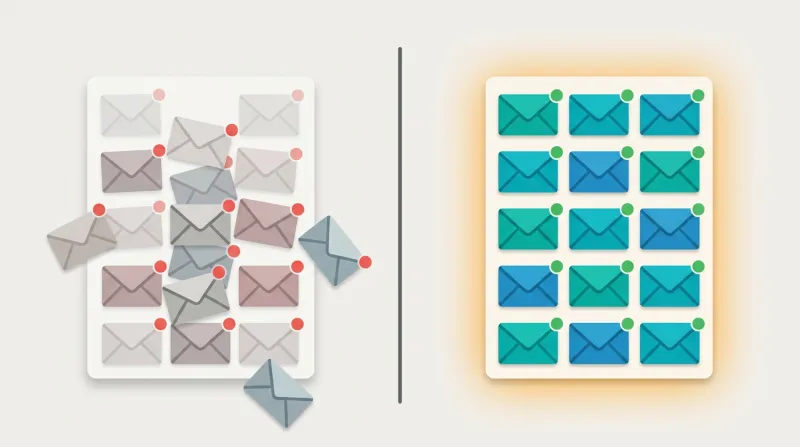
Advocacy organizations face deliverability challenges that commercial senders don't. A list you can't reach is a list you don't have.
Why Advocacy Email Gets Filtered
Political content filtering is getting worse. Gmail's Promotions tab frequently captures advocacy emails, and email providers are tightening filters on urgency language, which is exactly the language advocacy work requires. Subject lines like "ACT NOW" and "URGENT" trigger spam filters, but these reflect the legitimate reality of legislative deadlines.
Burst sending is the other challenge. When a bill hits a committee, organizations send to their full lists immediately. That burst pattern can trigger rate limiting and spam filters designed to catch spammers, not organizations with genuine urgency.
Technical Requirements That Are Non-Negotiable
As of February 2024, Gmail and Yahoo require three email authentication protocols for all senders:
- SPF (Sender Policy Framework), a DNS record authorizing your email platform to send on your domain's behalf
- DKIM (DomainKeys Identified Mail), a cryptographic signature proving the email wasn't altered in transit
- DMARC (Domain-based Message Authentication), a policy telling receiving servers what to do with unauthenticated email
Organizations sending without all three configured will see emails rejected or routed to spam. This is not optional. Your email platform should guide the setup, but your web team needs to configure the DNS records.
We also recommend using a dedicated sending subdomain (such as action.yourorg.org) to protect your primary domain's reputation. If your advocacy emails ever take a deliverability hit, your transactional emails (donation receipts, event confirmations) continue to reach inboxes.
Engagement-Based Sending
The single best thing you can do for deliverability: stop sending to people who don't engage.
The M+R Benchmarks 2025 report illustrates why this matters: nonprofits sent 9% more email in 2024 while email-sourced revenue declined 11%. More volume, less return.
That's the classic email trap: sending more to compensate for declining per-email performance, which accelerates subscriber fatigue and list churn. Advocacy organizations are particularly susceptible because genuine urgency makes every email feel like it deserves a full send. The discipline is knowing which moments truly warrant a blast to the full list versus a targeted segment.
Removing inactive subscribers feels counterintuitive, like shrinking your mobilization capacity. But a list of 50,000 engaged supporters will outperform a list of 200,000 where 150,000 never open. The smaller, engaged list has better deliverability, meaning more of your emails actually reach inboxes.
One caveat: open rates are increasingly unreliable as an engagement signal. Apple's Mail Privacy Protection, which accounts for roughly 46% of email clients, automatically preloads tracking pixels, making it look like emails were opened when they weren't necessarily read. For engagement tiers, click-through rate and action completion are more trustworthy indicators than opens alone.
Engagement tiers for advocacy:
- Active (opened or clicked in the last 90 days), send all campaigns
- Lapsing (90-180 days since last engagement), send high-priority campaigns only
- Inactive (no engagement in 180+ days), re-engagement sequence only
- Dead (no engagement in 365+ days), suppress or remove
The re-engagement sequence is three to four emails:
- "We miss you."
- "Here's what you missed" with an impact summary
- "Last chance" with an explicit ask to confirm interest
If no response, suppress from regular sends.
List Hygiene: The Petition List Problem
Petitions are the most effective list-building tool advocacy organizations have. They're also the fastest way to destroy your deliverability if you don't manage the quality of what comes in.
A successful petition can add thousands of email addresses in days. But many of those addresses are low quality:
- Fake addresses entered to show social support
- One-time engagers who signed under peer pressure and have no ongoing interest
- Typo addresses from hurried mobile signups
Without hygiene practices, these addresses pile up and erode your sender reputation.
We've seen this play out with volunteer portals and gated content areas. Organizations assume there's value in requiring a login or an email to access resources, but the result is predictable:
Gating content usually just creates friction. It degrades your contact lists because people use fake email addresses just to see what's on the other side.
The same dynamic applies to petition signups. People who aren't genuinely interested will provide throwaway addresses. The best mitigation is a strong welcome sequence that quickly identifies engaged contacts, paired with an aggressive sunset policy for those who never engage.
A Practical Sunset Policy
- Define inactivity: no opens or clicks in 90-180 days
- Run a re-engagement series (three emails over two to three weeks)
- If no engagement after the series, suppress from regular sends
- If still no engagement after six months, remove from the list
- Stagger removal over several days to avoid sudden list-size drops that affect reputation metrics
Ongoing Hygiene Practices
- Remove hard bounces immediately (most platforms do this automatically)
- Monitor soft bounces; three or more consecutive soft bounces should trigger suppression
- Process unsubscribes within 24 hours
- Run the list through an email validation service quarterly (ZeroBounce, NeverBounce, or BriteVerify)
- Watch for spam trap addresses (high complaint rates signal list quality problems)
- Remove role-based addresses (info@, admin@, webmaster@) that inflate list size without engagement
The tension between list size and list quality is real. Organizations instinctively resist removing contacts because every name represents potential mobilization capacity. But a clean list reaches more inboxes than a bloated one, and reaching inboxes is the entire point.
Single Opt-In vs. Double Opt-In for Advocacy
The regulatory landscape is simpler than most people assume:
- CAN-SPAM (United States) does not require any opt-in; it only requires an unsubscribe mechanism
- GDPR (European Union) requires consent but does not explicitly mandate double opt-in
- CASL (Canada) requires express consent, which is stricter than CAN-SPAM
For advocacy organizations, the practical choice comes down to speed versus quality.
Single opt-in means faster list growth, lower friction, and higher conversion rates. The risk is fake signups, typo addresses, and weaker consent documentation.
Double opt-in means slower growth (10-30% of subscribers never complete the confirmation), higher friction, but better list quality and stronger deliverability long-term.
Our recommendation for most advocacy organizations: single opt-in with an immediate welcome email and engagement confirmation within seven days. This balances the speed required by time-sensitive campaigns with list quality. If a subscriber doesn't open or click any email within 30 days, move them to a re-engagement segment before they damage deliverability metrics.
The exception: if your organization has European supporters and is subject to GDPR, double opt-in simplifies compliance documentation. Several EU countries (Germany, Austria, Luxembourg, Greece, Italy) require it outright.
What Most Email List Building Advocacy Content Gets Wrong
The existing content advocacy groups can find on this topic is fragmented into three silos:
- WordPress sites write about plugins without understanding advocacy
- Nonprofit vendors write about strategy without WordPress depth
- Advocacy specialists write about campaigns without covering list building
Each silo addresses one piece and ignores the other two. Nobody connects all three: WordPress implementation, advocacy strategy, and email list architecture.
Here are the gaps that matter:
The petition-to-subscriber pipeline: No existing content explains how petition signers become segmented email subscribers through form submissions, email platform sync, automated tagging, and welcome sequences.
Advocacy-specific segmentation: Generic advice treats all subscribers the same. Advocacy organizations need distinct segments from the moment of capture: action alert subscribers, event mobilizers, donors, volunteers, and general newsletter readers.
Multi-touchpoint capture strategy: Advocacy sites have unique conversion points that general email content ignores: petition pages, campaign landing pages, event registration, donation thank-you pages, and resource download gates. Each needs a different approach.
CRM integration for list management: The three-way integration among WordPress forms, the email platform, and the CRM is where most organizations struggle. Data syncing, deduplication, and maintaining segment consistency across platforms require deliberate architecture.
These aren't theoretical gaps. We've worked through each of them across nearly two decades of managing advocacy sites: building form-to-platform integrations, configuring tagging workflows that survive the chaos of a mass campaign driving thousands of simultaneous visitors, and testing the data flows that turn a petition signer into a segmented, actionable supporter record. The difference between a list that grows and one that mobilizes lies in these architectural details.
Building an Email List That Can Actually Mobilize
The metric that matters for advocacy email isn't subscriber count. It's mobilization capacity: the number of people who will take action within 48 hours of receiving an email.
A 50,000-person list that generates 3,000 phone calls to legislators in two days is more valuable than a 200,000-person list that generates 1,000. The first was built deliberately: segmented from the start, maintained through engagement-based sending, and cleaned regularly. The second was accumulated without a strategy and eroded through neglect.
Building that kind of list starts with the WordPress site. Every form, every petition, every event registration is an opportunity to capture not just an email address but an engaged supporter who understands what they signed up for and is ready to act when asked.
The technical foundation is straightforward: WordPress for capture, a dedicated email platform for delivery, proper authentication for deliverability, and segmentation from day one. The execution is where it gets hard, and that's where having a team that has built these integrations before makes the difference.
If your advocacy organization is evaluating how your WordPress site supports list building, or if you need a redesign that integrates capture, email, and CRM into a single architecture, our advocacy and policy organization services page explains how we approach this work. We've been building these systems for advocacy organizations for nearly two decades, and the architecture decisions made at the beginning determine whether the list you build can do what you need it to do when the moment arrives.