
Most pros and cons lists for WordPress Multisite read the same way: a balanced presentation that concludes with "it depends on your needs." That's technically true but practically useless. If you're evaluating Multisite for your organization, you need more than a list. You need someone who has lived with the consequences of this decision to tell you what actually matters.
We manage more than 30 affiliate websites for the National Peace Corps Association and around 200 WordPress sites total. We chose not to use Multisite for NPCA. We've also inherited and cleaned up Multisite networks that went wrong.
To be direct about where we stand: we hate Multisite. Not because it's broken. Because it was designed for a use case that most organizations have outgrown.
Over 32.4 million websites use WordPress Multisite, but that's only about 3.97% of all WordPress sites. The vast majority of WordPress users, including organizations managing large networks, have found better approaches.
That said, we're not here to dismiss it without reason. Here's what Multisite genuinely delivers and what it costs you.
What WordPress Multisite Actually Is
WordPress Multisite is a built-in feature that lets you run multiple websites from a single WordPress installation. All sites in the network share a single set of core files, a single database, and a single pool of plugins and themes. A Super Admin controls the entire network, while individual Site Admins manage their own content within the boundaries set by the Super Admin.
On paper, the pitch is compelling: update plugins once, and it applies everywhere. One hosting plan instead of twenty. Centralized user management. A single dashboard for everything.
The reality is more complicated.
The core problem is that sites in a network share a common software platform. From a developer's perspective, we see one system and think holistically. But the client sees individual websites. Those two perspectives collide fast.
When Group A needs a plugin that Groups B through Z don't, you end up with a massive library of plugins. Multiple forum plugins, multiple shortcode plugins, and no easy way to figure out which one is used where. It becomes a house of cards.
Once one plugin causes a conflict, it has a domino effect across the entire network. You can't simply replace a problematic plugin on one site because another site relies on it, and refactoring that site opens another can of worms.
The Real Pros of WordPress Multisite

These are the legitimate advantages of WordPress Multisite. We're including them because pretending they don't exist would undermine our credibility on the disadvantages.
Centralized Updates
One set of plugins, one set of themes. Update once, and it affects the entire network. This is the true power of Multisite, and we acknowledge it without qualification. For a 20-site network, that's 20 update cycles reduced to one.
For individual installations, you need automation tools to achieve the same level of efficiency. Our NPCA network has more than 30 sites with identical plugins, which means more than 30 update cycles instead of one. We use SafeUpdates to automate this weekly, so it's handled for us. But without such a tool, maintaining 20 or more individual sites becomes a real pain point.
The caveat: Centralized updates also mean centralized risk. A bad update breaks all sites simultaneously, not just one. The efficiency cuts both ways.
Cost Efficiency (With Conditions)
One hosting plan instead of twenty. One set of plugin licenses (sometimes). One SSL certificate if you're using subdomains with a wildcard cert. One maintenance contract.
For small, well-maintained networks, the cost savings are real. A 20-site Multisite network might cost $50 to $200 per month for hosting, while 20 individual sites could run $300 to $2,000 depending on the hosting tier.
The caveat: These savings assume your network stays simple. The moment sites need different plugins, the licensing math changes. Premium plugin licenses for Multisite typically cost two to three times more than single-site licenses. And the technical expertise required to manage a Multisite network often adds labor costs that offset the infrastructure savings.
Brand Consistency
Shared themes enforce visual standards across the network. Update the parent theme, and every site reflects the change. For organizations that need strict brand control, this is genuinely powerful.
Shared User Accounts
Users exist once in the network and can have different roles on different sites. For organizations using SSO or LDAP, the shared user table integrates cleanly. Members or staff who interact with multiple sites log in once.
Scalability of Provisioning
Adding a new site to a Multisite network is fast. No new hosting, no new installation, no new configuration. A few clicks in the network admin, and the site exists. For organizations that frequently create new sites, this reduces provisioning overhead.
The Real Cons and Disadvantages

These are the disadvantages of WordPress Multisite that tutorials and marketing pages tend to minimize. In our experience, they're the ones that determine whether Multisite works long-term.
The Future-Proofing Problem
This is the con that matters most, and the one most articles bury. Pantheon's own documentation states plainly: the choice between running WordPress Multisite or individual installations is effectively permanent.
When we built the NPCA network, we didn't know how the National Association would respond when affiliates started pressuring them for customizations. Would they hold the line or cave? Two years later, we still don't know what they'll do. Because we built standalone sites, decoupling is trivial. They were never coupled in the first place.
If we'd chosen Multisite and organizational needs changed later, separating sites would have been a data manipulation job: deep in the database, writing custom SQL scripts, matching post types, realigning file references. Sometimes it's easier to build from scratch than extract a site from a Multisite network.
This is the decisive factor we weigh most heavily. Every other disadvantage has workarounds. The inability to easily separate sites later does not.
Single Point of Failure
When your Multisite network goes down, every site goes down. A routine plugin update can take the entire network offline during business hours. For nonprofits with chapter sites processing donations, a network-wide outage during a giving campaign means lost revenue across every chapter simultaneously. With individual installations, the same issue would affect one site while the others continued running.
Plugin Compatibility Issues
Many WordPress plugins don't support Multisite. The testing burden increases with every plugin and every site. We've seen networks with 70+ plugins where no one could determine which plugins were used on which sites. The bloat made every update risky and every conflict difficult to diagnose.
Reduced Admin Autonomy
Site Admins cannot install plugins or themes. For organizations with technically capable chapter staff or departmental teams, this creates constant friction: frustrated Site Admins, a bottleneck on the Super Admin for every request, and ongoing tension between what chapters want and what the network allows.
Security Blast Radius
A Multisite network shares user tables, file systems, and database resources across all sites. A compromised password on one site can grant an attacker access to the entire network, and malware spreads through the shared file system.
A security incident on one chapter site becomes an incident across all of them, and cleanup requires taking the entire network offline. In individual installations, a breach is isolated to a single site. For organizations handling donor data or member information, the difference in exposure is significant, and shared risk at that level is rarely acceptable.
Performance Has No Isolation
All sites in a Multisite network share the same server resources. When one chapter launches a viral fundraising campaign and traffic spikes, every other site in the network slows down or goes offline.
Your donor pages fail during peak giving season because another chapter's success overwhelms the shared infrastructure. One site's success becomes everyone else's failure.
Database Complexity at Scale
Each site adds approximately 11 database tables. At 50 sites, that's 550 tables. At 500 sites, 5,500 tables. Shared tables like wp_users and wp_usermeta become bottlenecks. When we inherited the AIER ecosystem after its Multisite separation, the main site's database had over 150 tables, including 48 orphaned analytics tables from the Multisite era. That technical debt took focused effort to clean up.
Management Overhead Is Real
Managing a Multisite network requires dedicated technical resources. A nonprofit paying $200/month for managed Multisite hosting but needing $150/hour developer time for troubleshooting may spend more than individual sites with automated management tooling. The cost savings from Multisite can be completely offset by the labor required to maintain it.
The Horror Stories Nobody Publishes
We can take a strong position on this because we've seen what happens when WordPress Multisite goes wrong. These aren't hypothetical scenarios.
The University Nightmare
A large university's communications department had allowed students to run their own journalistic websites: student clubs, athletics, and various topic-focused groups. Over 100 individual blogs inside one WordPress Multisite system.
Some sites had unique domain names, some used subdomains, and some used directory structure. Students managed everything with no professional developer oversight. By the time they contacted us, every time something broke, they couldn't fix it. They'd tried updating plugins, tried everything.
The database was massive, over 180 gigabytes. We couldn't work on it locally, so we had to use their aging server, which was stuck on an older PHP version.
They had a huge number of themes, every site slightly different. Students modifying CSS in the visual editor, complaining when updates broke their custom styling. Around 70-plus plugins, not all active on all sites.
The core problem: every student group treated its site as its own. They installed whatever they wanted without understanding they were part of a network that needed to be updated at its core. The bloat was so severe that untangling active sites from inactive ones was impossible.
After a year and a half, the university moved very slowly on decisions; we'd made no progress on the larger plan. We fixed individual support tickets as they came in, but between student turnover and the sheer scale, we could never actually execute. The project stalled completely.
The Think Tank Cleanup
We inherited a DC think tank after a WordPress Multisite split had already happened. We weren't involved in the separation, but the remnants of the Multisite system were everywhere.
The previous developer had copied the entire database from the network to each of the three new sites without removing orphaned data. All plugins were copied over and activated on every site, regardless of whether that site needed them. Massive database bloat, slow queries across all three sites, code conflicts, and update conflicts.
It took us about a month of careful work, backups at every step, deactivating plugins one by one, and scrubbing orphan content from the databases. This particular think tank had a strong budget. For a smaller organization, this cleanup would have been nearly impossible to afford.
The Genzeon Rescue
While not a Multisite case, the Genzeon rescue illustrates the same pattern we see with Multisite gone wrong: an organization locked into an architectural decision that previous developers couldn't fix. After multiple failed attempts with other firms, we rebuilt their headless WordPress site as a traditional installation in weeks.
Architectural decisions are hard to undo. Multisite is one of the hardest.
The Extraction Problem: Why This Decision Is Permanent
If you're already running a WordPress Multisite network and considering separating sites, here's what that actually looks like.
All that data is stored side by side, interwoven, and identified by unique IDs. The coding and references are all relative to the main network site. These aren't migration jobs. They're data manipulation jobs.
We end up deep in the database: separating media files, writing custom SQL scripts, matching post types, recreating custom post types in the new site, and running search-and-replace scripts to realign file references. Catching every single reference is a massive challenge.
Sometimes, we determine it's easier to build from scratch and do manual copy-paste rather than extract data. The decision depends on the volume of content and the complexity of the data.
For a smaller site with a few hundred pages, we'll build a fresh installation and manually move the content. For larger sites, we write the migration scripts, but you end up running scans, finding broken links, and writing regex patterns to match things up. It's an exercise in patience.
This is another reason to avoid WordPress Multisite from the start: if you ever want to separate later, the cost and effort are significant. Pantheon's own documentation puts it bluntly: once you commit to a WordPress Multisite network, the decision is effectively permanent.
Does Multisite Actually Save Money?
This is where Multisite genuinely shines, at least in theory. One set of plugins, one set of themes, update once, and it affects the entire network. That's far easier than managing 20 individual installations.
Our entire argument has been that organizations don't maintain the discipline required to keep it clean. But if you can combine single-set management with strict governance and limit it to one or two super users, there's a real argument for Multisite.
Without Multisite, you need additional tools. Our NPCA network has more than 30 sites with identical plugins. That's more than 30 update cycles instead of one. We use SafeUpdates to automate this weekly, so it's handled for us. But without such a tool, it becomes a real pain point.
Multisite also saves on hosting, as multiple domains can be hosted under one plan instead of 20 separate plans. That adds up.
The bottom line: savings exist for simple, well-maintained, strictly governed networks. Complexity erases those savings fast. If you're working with a professional firm that provides hosting and automated update tools, individual sites with proper tooling are still better. But if you're managing it yourself with no automation, the cost of separate hosting plans and manual updates is a legitimate consideration.
Is WordPress Multisite Worth It? Score Your Organization
Rather than a generic "it depends," here's a framework for scoring whether WordPress Multisite is right for your specific situation.
| Factor | Score +1 (Multisite) | Score +1 (Individual) |
|---|---|---|
| Network size | Under 10 sites | 10+ sites |
| Plugin uniformity | All sites use the same plugins | Sites need different functionality |
| Admin autonomy | One designated Super Admin | Multiple people want control |
| Customization needs | Purely cosmetic differences | Functional differences between sites |
| Performance | Low, predictable traffic | Variable traffic, seasonal spikes |
| Security sensitivity | Shared risk is acceptable | Data isolation matters |
| Future flexibility | Network is permanent | Sites may be transferred or sunset |
| Technical resources | Dedicated technical team | Limited or rotating technical staff |
Score 6-8 Multisite: Multisite is likely a reasonable choice for your organization.
Score 4-5 either way: Evaluate carefully. The decision is close, and the details of your specific situation matter.
Score 6-8 Individual: Individual installations with centralized management will serve you better.
If you scored 3 or more points toward individual installations, Multisite will likely create more problems than it solves. The operational efficiency gains won't overcome the architectural limitations.
When Multisite Does Work
We'd be dishonest if we said Multisite never works. There are scenarios where it's the right call:
Small, uniform networks. Five to ten sites where every site runs the same theme, same plugins, same functionality. Nobody needs anything different. Nobody will ever need anything different.
Centralized technical management. One person or one agency handles all technical decisions. Individual sites don't have technical staff or volunteers who want administrative access. Understand exactly what this role entails by reviewing the day-to-day management reality before committing.
Strong governance culture. The central office is comfortable saying no to requests, and site owners accept the boundaries without significant friction.
Budget-constrained operations without professional support. This distinction matters. If you're working with a professional firm that provides hosting and automated update tools, individual sites with proper tooling are still the better choice. If you're doing it yourself with no automation, the math changes.
If you're leaning toward Multisite after reading all of this, the next decision is your URL structure. We cover that trade-off in subdomain vs subdirectory for WordPress Multisite.
What We Recommend Instead
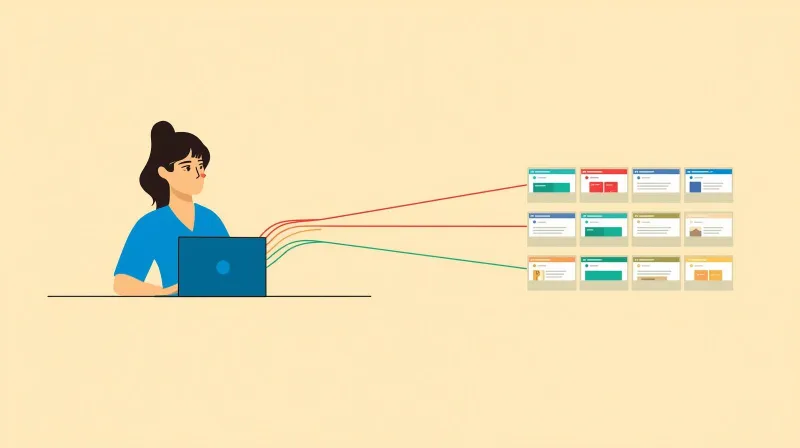
For most organizations managing multiple WordPress sites, we recommend installing each site individually with centralized tooling. This gives you:
- Centralized updates through SafeUpdates or tools like MainWP/ManageWP
- Brand consistency through shared themes deployed via Git
- Cost efficiency through bundled hosting and maintenance
- Performance isolation where each site has its own resources
- Future flexibility where any site can be independently modified, transferred, or sunset
- Contained security where a breach on one site doesn't compromise the network
How We Built It for NPCA
When the National Peace Corps Association approached us, we had two challenges: build their national website (a migration from SilkStart) and figure out what to do with more than 30 affiliate group sites from the old system.
Multisite came up immediately, because they were thinking "network of WordPress websites." They're non-technical. They didn't know the difference between Multisite and individual installations.
Given our experience, we knew our ability to support this many sites long-term would be easier with standalone installations.
We planned the national site separately. For affiliates, we created a custom WordPress theme with three configurable brand colors and the ability to upload logos. Each site was uniquely branded, but the structure was identical across all of them. We locked the plugin list to a curated set that covered exactly what affiliates needed, and affiliates got editor access only, with no ability to install plugins or themes.
That sounds restrictive. It's also the governance discipline that Multisite demands and most organizations never sustain. The difference is that when an affiliate eventually does need something different, we can give it to them without touching the rest of the network.
More than 30 sites, two years of operation, zero regrets about not using Multisite.
Should I Use WordPress Multisite? The One Thing to Know Before You Commit
WordPress Multisite is designed to provide a consistent experience for groups. It is not designed to give each group its own website to do whatever it wants. The moment you push beyond that boundary, the problems start.
The question isn't "how do I set up Multisite?" It's "Does my organization have the governance discipline to maintain a uniform network indefinitely?" If the answer is anything other than an unqualified yes, you have your answer.
WordPress went from a blogging platform to an enterprise CMS. Multisite stayed where it was. It was originally designed for personal blogs, back before social media, when blogging was something individuals did. The system didn't evolve with the rest of WordPress.
If that context matters to your decision, it should. When weighing the WordPress Multisite pros and cons, you're evaluating a 2010-era architecture for 2026 organizational needs.
Frequently Asked Questions
What is WordPress Multisite?
WordPress Multisite is a built-in WordPress feature that runs multiple websites from a single installation. Every site in the network shares one set of core files, one database, and one pool of plugins and themes. A Super Admin controls the network while individual Site Admins manage only their own content, within limits the Super Admin sets.
Is WordPress Multisite worth it?
For small, uniform, strictly governed networks under about ten sites, yes. Beyond that, the operational efficiency rarely survives contact with real organizational needs. Roughly 3.97% of WordPress sites use Multisite, and most large networks we encounter have moved away from it. Score your situation against the eight factors above rather than relying on a general answer.
What are the main disadvantages of WordPress Multisite?
The one that matters most is permanence: separating a site from a network later is a database manipulation job, not a migration, and it is sometimes cheaper to rebuild from scratch. After that, the significant ones are a single point of failure across every site, a shared security blast radius, no performance isolation between sites, plugin compatibility gaps, and Site Admins being unable to install anything themselves.
Can you separate a site from a WordPress Multisite network later?
Yes, but it is expensive and slow. The data is interwoven and keyed by network-relative IDs, so extraction means separating media, writing custom SQL, recreating custom post types, and running search-and-replace to realign file references. For smaller sites we often rebuild and move content by hand instead. Treat the decision to adopt Multisite as effectively permanent.
Does WordPress Multisite save money?
It can, for simple networks. One hosting plan instead of twenty, one update cycle instead of twenty. Those savings are real but fragile: premium plugin licenses for Multisite typically cost two to three times the single-site price, and the technical expertise required often offsets the infrastructure savings. With professional hosting and automated update tooling, individual sites usually win on total cost.
What should I use instead of WordPress Multisite?
Individual installations with centralized management tooling. Use SafeUpdates, MainWP, or ManageWP for one-click updates across sites, deploy a shared theme via Git for brand consistency, and bundle hosting for cost efficiency. You keep the efficiency benefits while retaining performance isolation, contained security, and the ability to modify or transfer any site independently.
Need Help Deciding?
Whether you're weighing WordPress Multisite pros and cons, managing an existing network, or looking for a better approach to multi-site management, we've been through this decision many times with real organizations. Talk to our team and we'll give you an honest recommendation based on your situation, not ours.