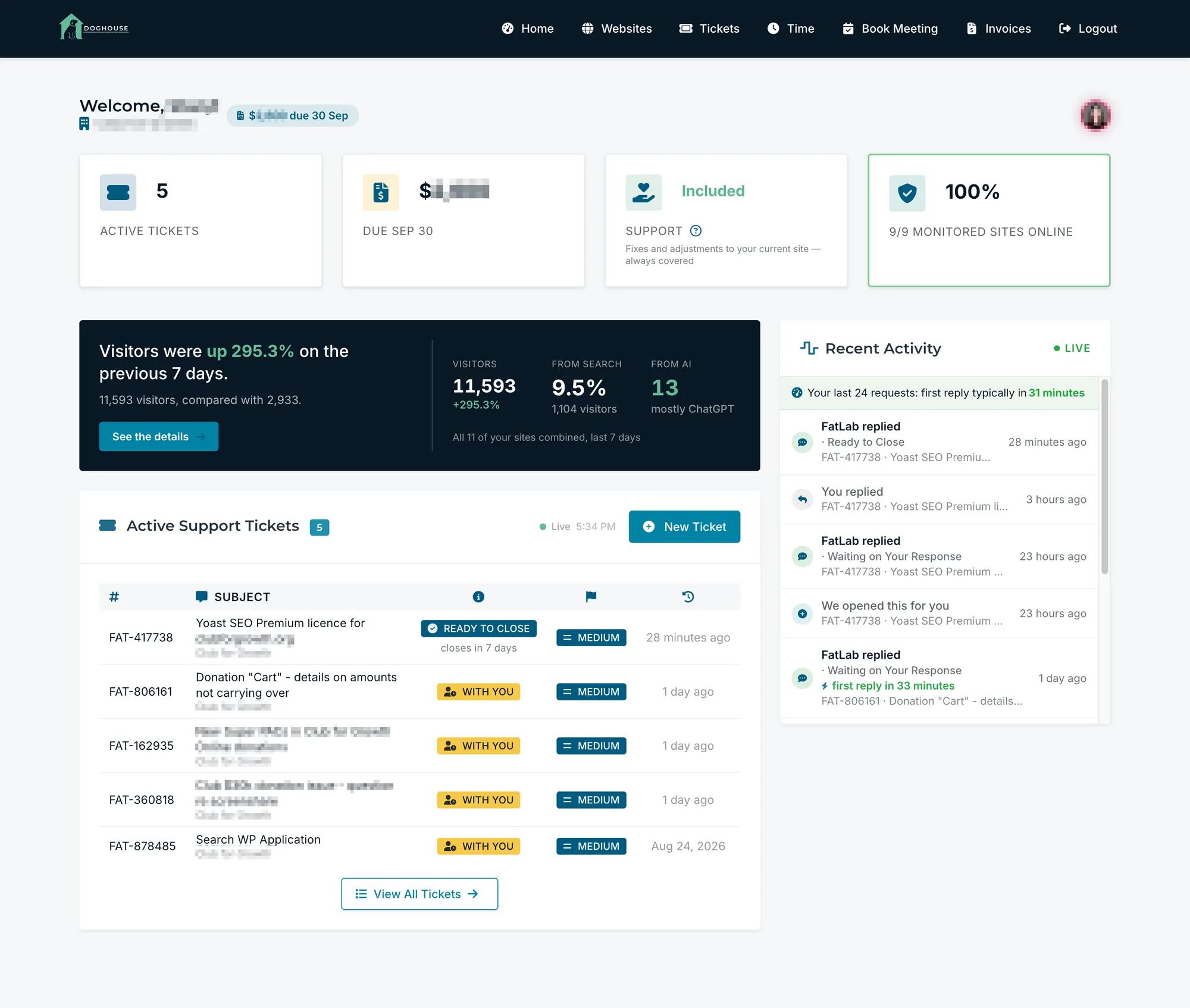
Everything in one place, and that is the lot
No modules to buy, no tabs you don't have access to, and nothing hidden behind a plan tier.
Requests
Everything you have ever asked us for, with a live status on each one and the full thread underneath.
Invoices
Full history, PDF downloads, card and ACH payments, saved methods, and receipts sent wherever you need them.
Time
Every hour we worked, what it was for, and whether it counts against your plan or costs you anything.
Traffic
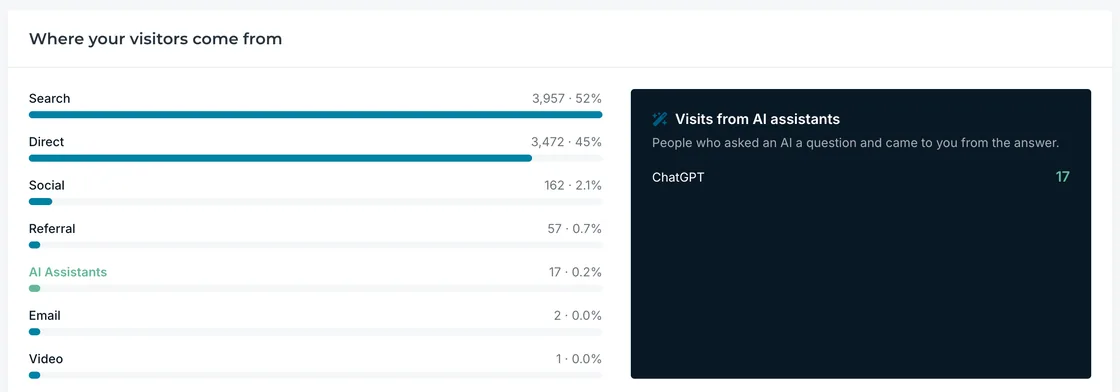
Visitors, sources, and your most-read pages, including the people who arrived from an AI assistant.
Websites
Every site we look after for you, each with its own record of the work we did and the delivery stack behind it.
Meetings
Book time with the right person on our team for what you need, without a form or a gatekeeper in the way.
Watch your request move
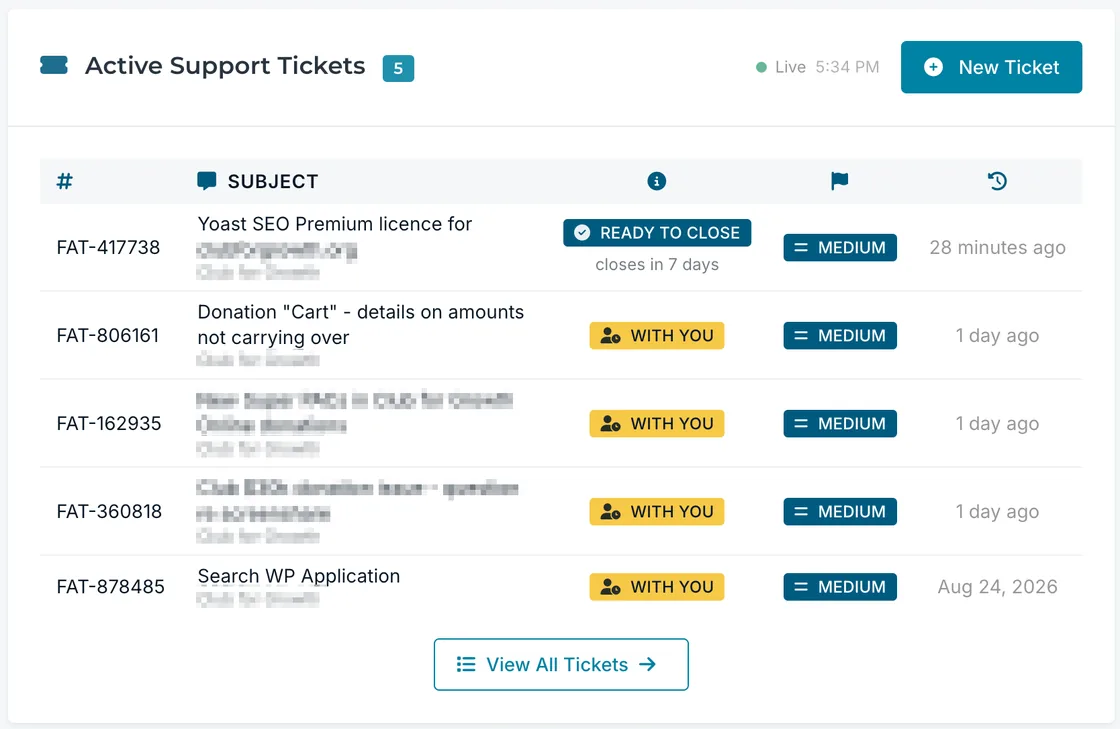
Most support portals have two states: Open and Closed. Ours tells you whether the ball is with us, with our developers, or with you, and it says so on the row.
- Know instantly whether anything is needed from you
- Work we believe is finished says so, with the date it will close
- Check it at eleven at night without emailing anyone
The full vocabulary
Nine states, each with its own label, so nothing has to be guessed at.
- New RequestReceived, not yet triaged.
- Being Worked OnSomeone is doing it right now.
- Queued for DevelopmentHanded to the development team.
- In DevelopmentBeing built.
- Waiting on Your ResponseWe are blocked on you.
- With FatLab TeamThe ball is with us.
- On HoldParked, with a reason and a date.
- Ready to CloseWork done. Silence confirms it.
- CompletedDone.
Nothing is needed from you
The work is finished. If you say nothing, that confirms it and the request closes on the date we gave you.
We cannot move without you
We are blocked. Usually that means a decision, a file, or a login only you can provide.
On hold is never a dead end
When we have to park something, you get the reason in plain language, and when we think a job is finished, we say so with the date it will close.
- Reminders at seven and fourteen days, then a close at twenty-eight
- One click to agree, with no reply to write
- A date already passed is hidden, because a stale deadline is worse than none
Waiting on the plugin vendor's next release.
We'll pick this back up on Nov 12, 2026.
We think this one's wrapped up. Reply if anything is still off; otherwise, we'll close it on Nov 12, 2026.
All good, close it
Proof, not promises
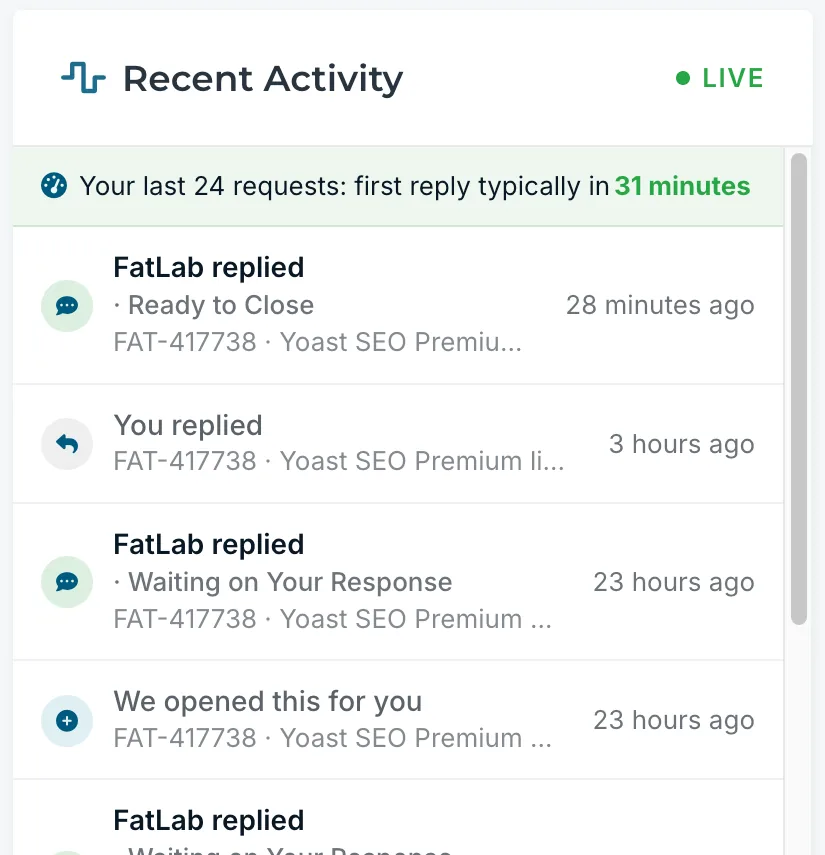
The first thing on your dashboard is not a sales message. It is the last few things that actually happened on your requests, written in your language rather than ours.
- Every reply, assignment, and status change, in one live feed
- Requests we raised ourselves say so, because you did not submit them
- It sits above everything promotional, on purpose
What you owe, and nothing you did not expect
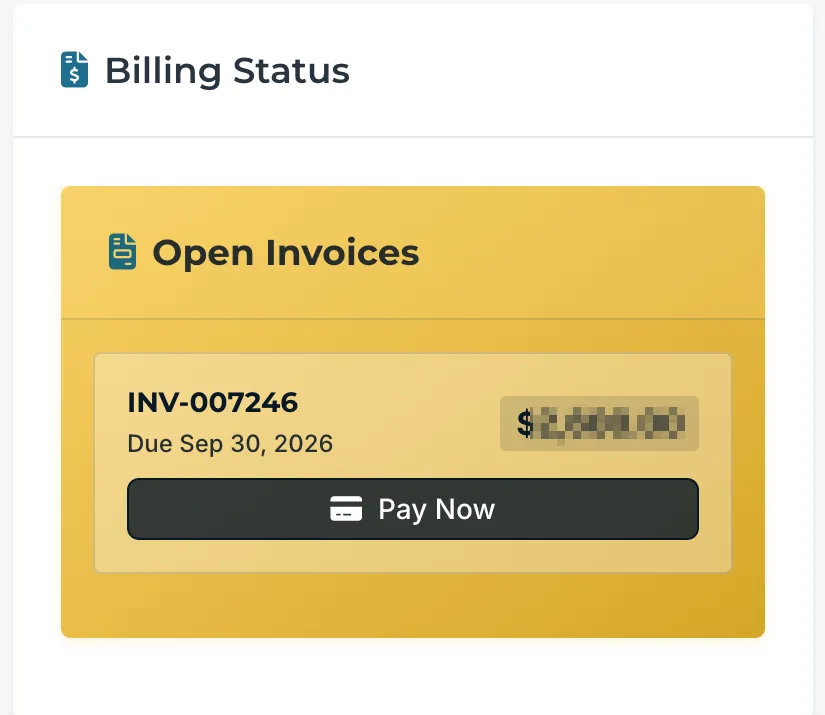
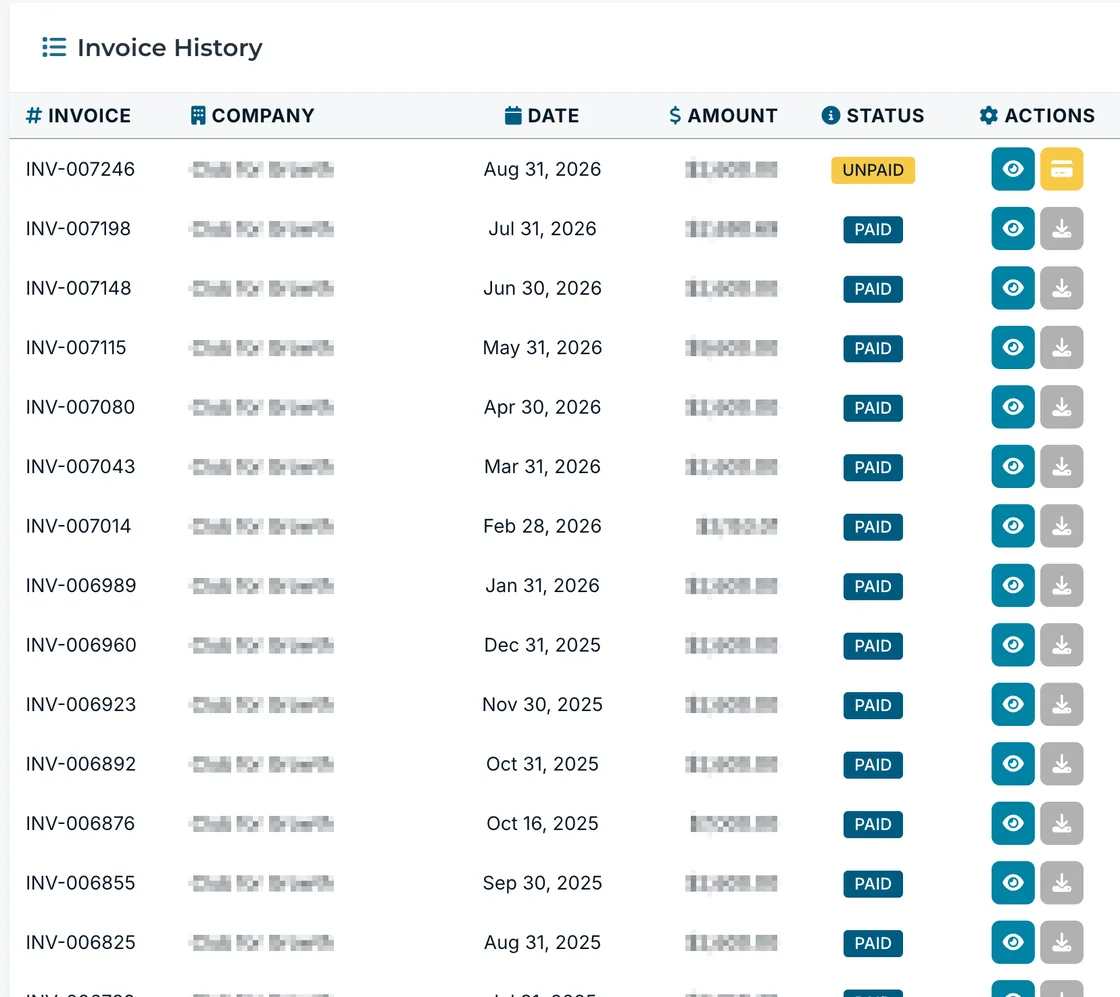
Every invoice we have ever raised, with its status, a PDF you can download, and a way to pay it without leaving the page.
- Card, ACH bank transfer, or check, with the mailing address printed
- Receipts sent automatically to a bookkeeper or an accounts payable inbox
- The figure beside your name is everything unpaid, so there is no second bill
Every hour we worked, and what it cost you
Support on the site you already have is not metered. It is counted in requests handled, never billed by the hour, and it never eats into your development time.
- Development hours are the measured part, and they are shown against your plan
- Anything beyond your plan is agreed with you before we start, never after
- Twelve months of history, so you can see what a normal month looks like

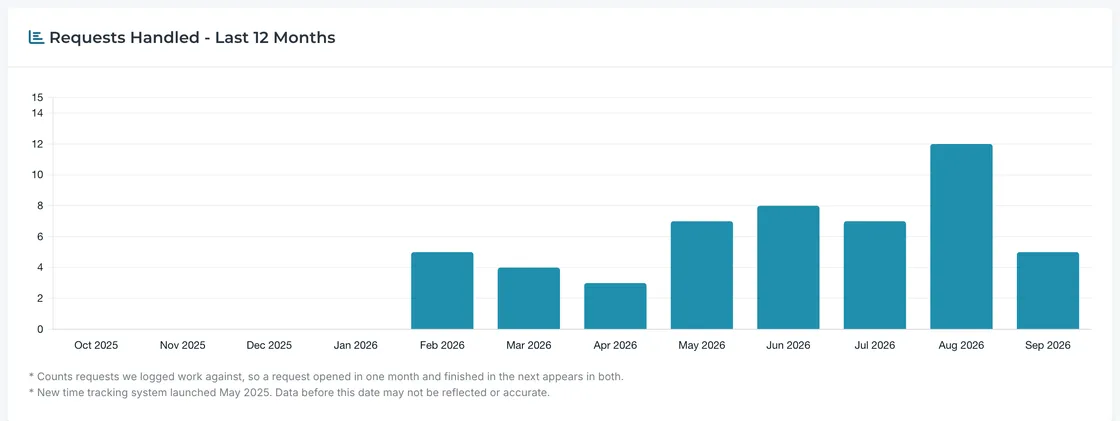
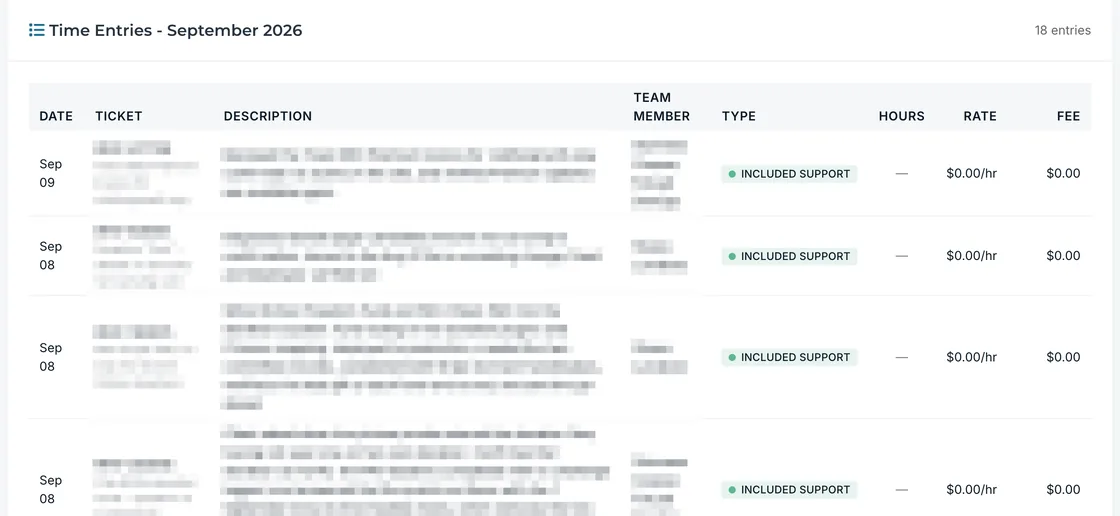
Included support shows no hours and no rate, because it is not metered.
Your traffic, in plain English
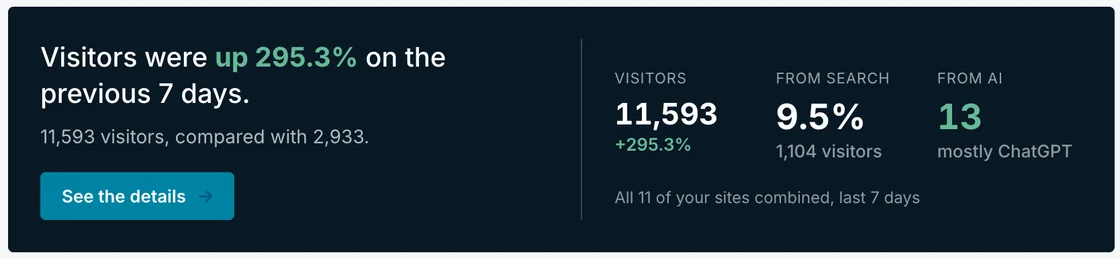
Once a day, the top of your dashboard picks one true and interesting thing about your traffic and says it in a sentence, with the numbers behind it alongside.
- Changes once a day, not once a refresh, so the numbers stay trustworthy
- Visits from AI assistants get their own panel, broken down by assistant
- No cookies, no personal data, and no cookie banner
Everything we did to your site this month
Not a list of features that are switched on. A record of work performed, with the period it covers named every single time.
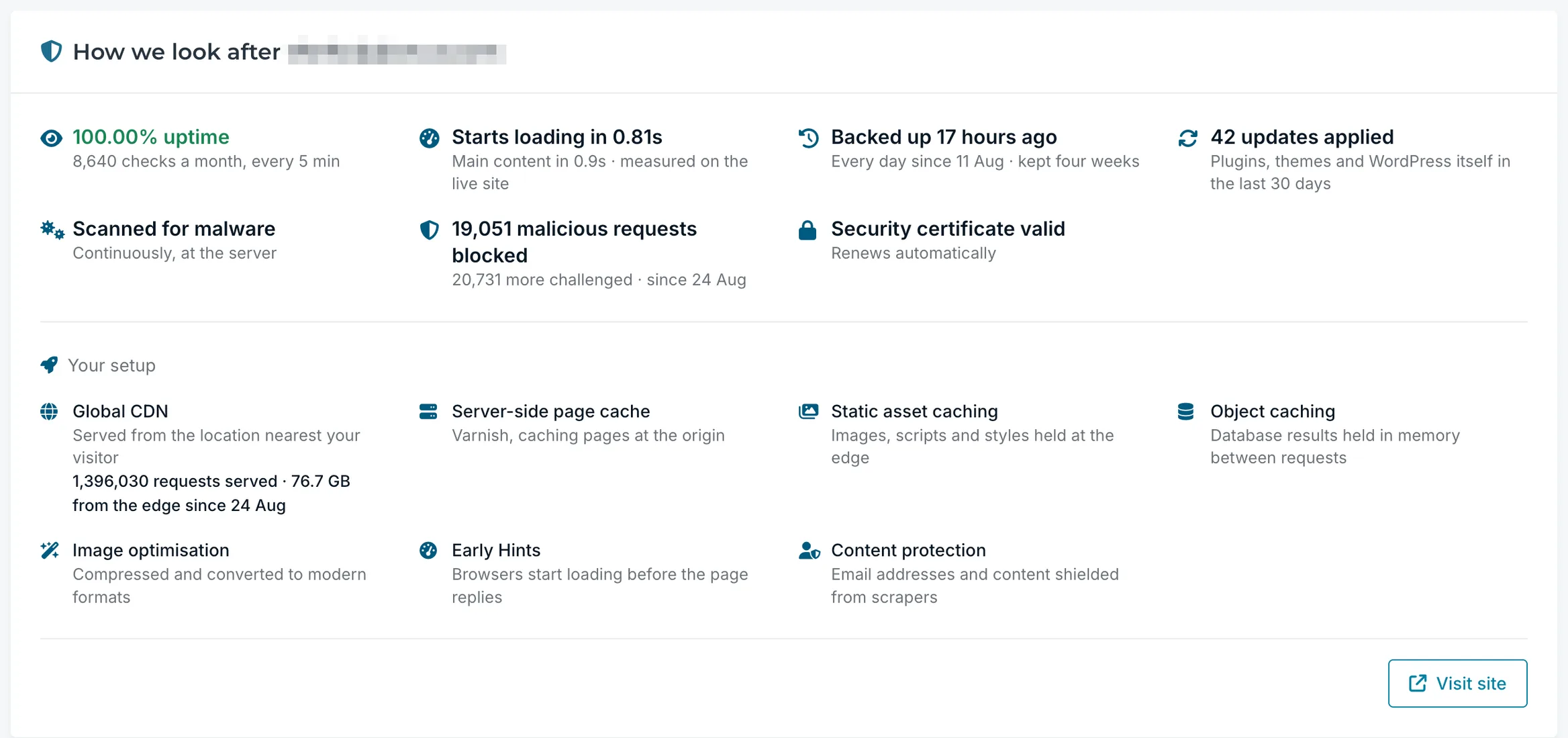
Your uptime is on the card, whatever it says
Most hosts keep this number to themselves. We put it in front of you, because if your uptime is not what it should be then we need to know and fix it. Hiding it would only delay that.
The checks are the work
Check counts, not just percentages. A percentage is a result; "we looked 8,640 times" is the effort behind it.
Counted separately, never combined
Threats blocked and threats challenged are reported apart, because a visitor asked to prove they are real is not a request we turned away.
Bad updates get rolled back
When an update does break something we roll it back before it reaches you, and that gets its own line on the card.
Any agency can buy a portal
These are rules the code actually enforces, and they are the part a competitor cannot copy by installing a plugin.
It goes quiet rather than spinning
A site with rollbacks but no successful updates shows nothing at all, because "0 updates applied, 6 caught before they reached you" is true, cheerful, and wrong. Where the honest answer is unflattering, you get no line rather than a defensive one.
An absent number is never a zero
A site still collecting data has no figure. A site with a genuine zero has one. Rendering both as "0" would suggest your site had no visitors when the truth is we haven't looked yet. For this reason, four separate empty states exist.
Nothing can read as a shortfall
No ratios and no utilization figures on your site's card. A number that can be "low" invites you to read a failure into your own site. Storage was considered and rejected on those grounds, because a consumption metric reads as "am I near a limit?"
No number is inflated to look better
How much traffic a site gets never changes how carefully its figures are handled. Three visitors against one is a 200 percent rise, arithmetically true and completely meaningless, so comparisons below twenty visitors are suppressed rather than dressed up. An honest silence beats a number we would have to explain away.
What you get, in full
Requests
- Nine client-facing statuses
- Full message thread, both sides
- Rich-text replies with attachments up to 100MB
- Submit in the portal, or just email us
- Email replies land back on the request
- Draft protection if your session expires
- Hold reasons and resume dates in plain language
- Published auto-close schedule
Sites and traffic
- Uptime percentage and the check count behind it
- Updates applied and updates rolled back
- Threats blocked and challenged, counted separately
- Backup age, retention window and unbroken streak
- Security certificate status and auto-renewal
- First Contentful Paint from the live site
- Your delivery and caching stack, per site
- Visitors, sources and most-read pages
- AI assistant visits as their own channel
Money and access
- Itemized entries by date, request, description and type
- Twelve months of requests-handled history
- Development hours measured against your plan
- Invoice history with PDF downloads
- Card, ACH, and check payments
- Saved payment methods, and recurring billing on request
- Receipts to a bookkeeper or AP inbox
- Passwordless sign-in, no password to leak
- Limited-view contacts for shared accounts
Included with every Watch Dog plan
DogHouse is not for sale. There is no sign-up page, no pricing tier, and no add-on. We did not build it to sell; we built it to run FatLab, and our clients get it because they are our clients. That is the whole arrangement.
We built it, and we run our own company on it
DogHouse is not a third-party helpdesk with our logo dropped into the corner. We didn't buy it, license it, or rebrand somebody else's tool. We wrote it.
Every part of FatLab runs on it, from a new inquiry through to a paid invoice and an answered request. That is why the status labels match how we actually work, not how some other company's software assumed we would.
Our plans are Watch Dog plans. The portal that comes with them is DogHouse. Want the longer story? Read DogHouse 2.0: The Platform We Built to Run FatLab.
Client Portal FAQs
Have more questions? View all frequently asked questions.
How do I know when you are working on my request?
Your portal shows a status on every request, and it changes as the work moves. There are ten of them, so you can tell the difference between "we have it," "someone is working on it right now," "it is with our developers," "we are waiting on you," and "we think it is done." Most support portals collapse all of that into a single Open label. You can check it whenever you like without emailing anyone to ask.
Does the client portal cost extra?
No. It is included with every Watch Dog plan at no separate charge. We also don't sell it on its own. There is no sign-up page or pricing tier because we built DogHouse to run FatLab, not to sell as a product.
Do I have to use the portal to get support?
No, but it is the best place to start. A request raised in the portal is tracked from the moment you send it, and you can watch it move without asking anyone where it stands. Email works too, and plenty of clients use it. Write to support@fatlabwebsupport.com and a request opens automatically, tracked from the moment it lands. If you email one of us directly instead, we open it for you. Either way it appears in your portal with a status on it, and the conversation carries on there, which is exactly what stops it going quiet.
Can I see what you actually did to my site?
Yes. Each site has a care record showing work performed rather than settings switched on: how many updates were applied, how many were tested and rolled back before they reached you, how many malicious requests were blocked, when the last backup ran, and how many uptime checks we made. Every figure names the period it covers, so you always know what window you are looking at.
What happens if I never reply to a request?
Nothing gets lost, and nothing sits open forever. A request waiting on your response gets a reminder at seven days and another at fourteen. At twenty-one days it moves to Ready to Close, and it closes at twenty-eight. When we believe a piece of work is finished, you get a note with the closing date and a one-click button to confirm, so agreeing doesn't mean writing a reply.
Is there a password to manage?
No. You sign in with a link sent to your email address, or with a six-digit access code. There is no password to forget, reset, reuse, or leak.
Can other people at my organization have access?
Yes, and you can narrow access. You can limit a contact to their own requests only, without company-wide traffic, hours, or invoices. That is useful for associations and multi-chapter organizations where several people submit requests, but only some should see billing.
What traffic data does the portal show, and does it use cookies?
Visitors, pageviews, pages per visit, where your visitors came from, your most-read pages, and a panel for visits that arrived from AI assistants like ChatGPT. It runs on Plausible, which sets no cookies and collects no personal data, so it doesn't need a cookie banner. We are also upfront that no script-based analytics sees every single visitor, and the portal says so rather than claiming otherwise.
Can I see the hours you worked and what they were for?
Yes, as line items rather than a monthly summary: the date, the request it belonged to, a description of what was done, the type of work, and the hours. Support work on your existing site is not metered. We measure development hours against your plan. If a piece of work is going to run past what your plan includes, we talk to you before we start, so anything beyond it is agreed in advance rather than a surprise on an invoice.
Can I pay invoices through the portal?
Yes. Invoice history, PDF downloads, card and ACH payment, saved payment methods, and recurring billing all live in the portal. You can also nominate a bookkeeper or an accounts payable address to automatically receive paid-invoice receipts.
Can I book a call without going through a form?
Yes. Book a Meeting inside the portal puts you straight onto the calendar of the right person on our team, in fifteen, thirty, or sixty-minute slots. Each person lists what they are the right person for, so you can pick based on what you need. No gatekeeping and no triage layer in between.
Did you really build this yourselves?
Yes. DogHouse is not a rebranded third-party helpdesk with our logo on it. We wrote it, and we run our own company on it every day. That is why the status labels match how we actually work, not how someone else's software expected us to. You can read more about it in DogHouse 2.0: The Platform We Built to Run FatLab.
The portal comes with everything we do. If you're figuring out which plan fits, start with WordPress support services or WordPress maintenance, or compare the Watch Dog hosting plans side by side.
What Our Clients Say

Gage Houser
Executive Director, AVSAB
Rock-Solid Support, Seamless Operations
FatLab has ensured our nonprofit trade association site runs smoothly and efficiently—from quick fixes to strategic consultation.

Jason Wu
Director of Operations, Human Services Council
Zero Downtime, Unmatched Support
Since migrating to FatLab, we've experienced zero downtime and prompt, effective responses to every question.

Alex Lucas
Marketing Manager (Head of Marketing), Genzeon
Project Rescue, Perfect Execution
After multiple failed attempts with other firms, FatLab rescued our website project and launched it in weeks. They followed our approved design perfectly and delivered a complex WordPress site that's easy to manage.