Updated September 2026. When this post first went up in June, DogHouse 2.0 was mostly a new look on a proven foundation. We have shipped more than 130 releases since, and the client side has changed so much that I rewrote that part of this post from scratch.
About a year ago we published a post introducing DogHouse, our client portal. It was a short, frankly overcooked announcement that didn't really explain what we built or why. This is the post I should have written then, now that DogHouse has a year of real use behind it and a brand new version to go with it.
Here is the short version. DogHouse is software we built ourselves, from scratch, to run FatLab. It is the portal our clients log into, and it is also the system we use to run the entire business behind the scenes. Since June, it has picked up uptime reporting, a full record of the care we give every site, and real website analytics. The theme running through it all is simple: if we know something about your website, you should be able to see it too.
A quick word on the new look
If you read our recent post about FatLab's new look, DogHouse 2.0 is that same story applied to our software. We retired the old dark theme and rebuilt the interface as a lighter, cleaner, more corporate-friendly design. New logos, the new color palette, and the new typography (Montserrat and Inter) now run through every page, and even the emails DogHouse sends you.
We also rebuilt the styling on a modern design-token system, which is a developer way of saying the whole interface pulls from one consistent set of colors, spacing, and type rules. At launch, that foundation was the point of the release. It is also why everything that followed shipped as quickly as it did.
DogHouse even has its own logo now: a doghouse with the same Labrador that anchors the FatLab brand. It is part of the family.
What DogHouse actually is
Most web hosts hand you a generic control panel, usually something off the shelf with their logo on it. DogHouse is not that. We didn't buy it, license it, or rebrand someone else's tool. We wrote it, line by line, for the specific way FatLab works with clients.
That distinction matters. It means DogHouse fits our process instead of forcing our process to fit software. When we change how we do something, we change the tool to match. When a client asks for something reasonable, we can often just build it.
It has two sides. The side you see is the client portal. The side you don't see is the back office that runs our company, from a brand-new sales lead through a paid invoice and an answered support ticket. Both run on the same system.
What's new in the client portal since June
This is the part built for you, and it is the part that has changed the most. If you are a FatLab client, here is what is waiting when you log in today. Our client portal page has the full tour, but here are the highlights.
Your dashboard leads with what actually happened
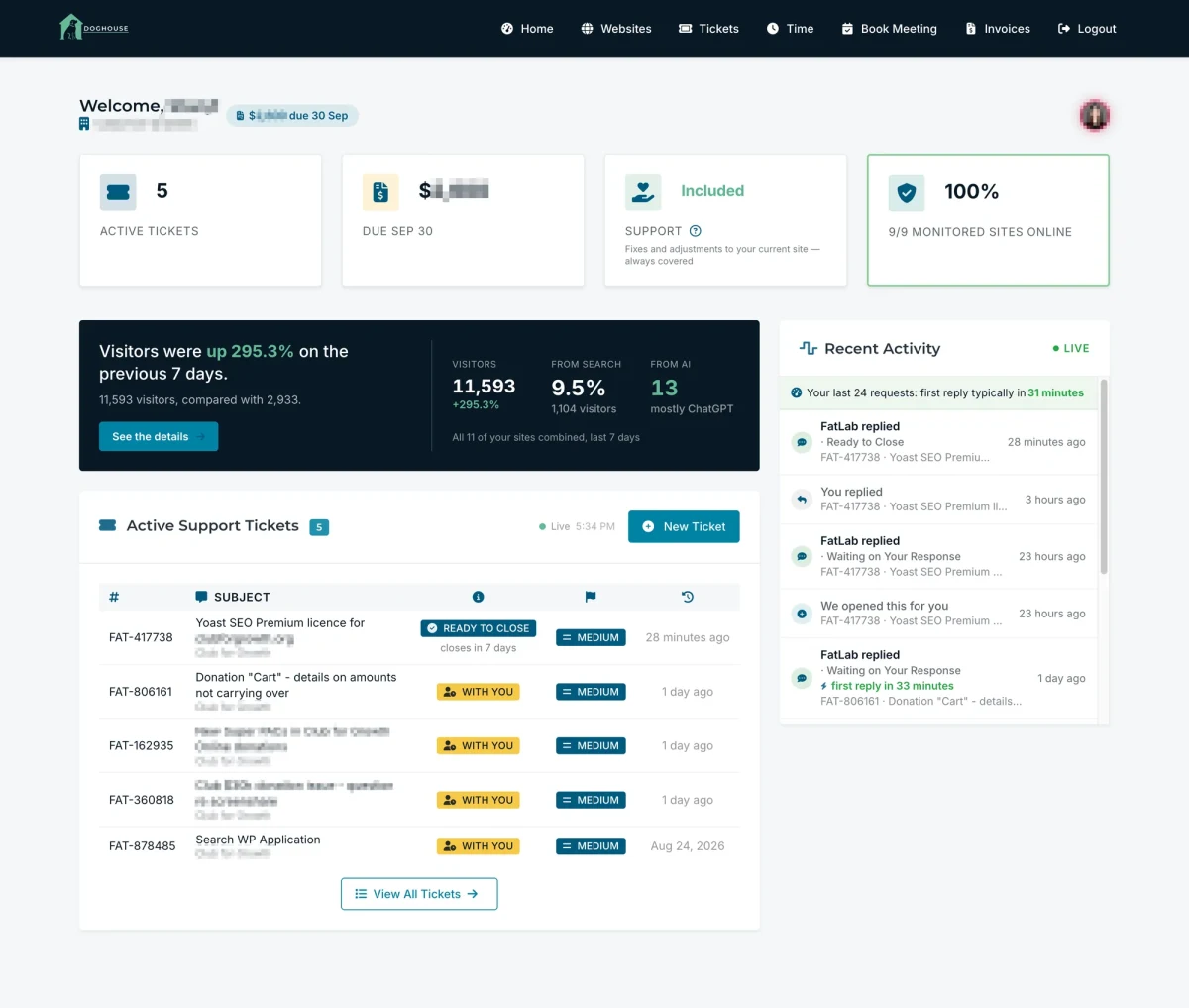
The first thing on your dashboard is not a sales message. It is a live feed of the last few things that happened on your requests: every reply, every assignment, every status change, written in plain language rather than our internal shorthand. If we opened a request ourselves, it says so, because you did not submit it.
The top of that feed shows how quickly we typically responded to your recent requests, measured from your request to our first reply. We would rather show you that number than claim it on a sales page.
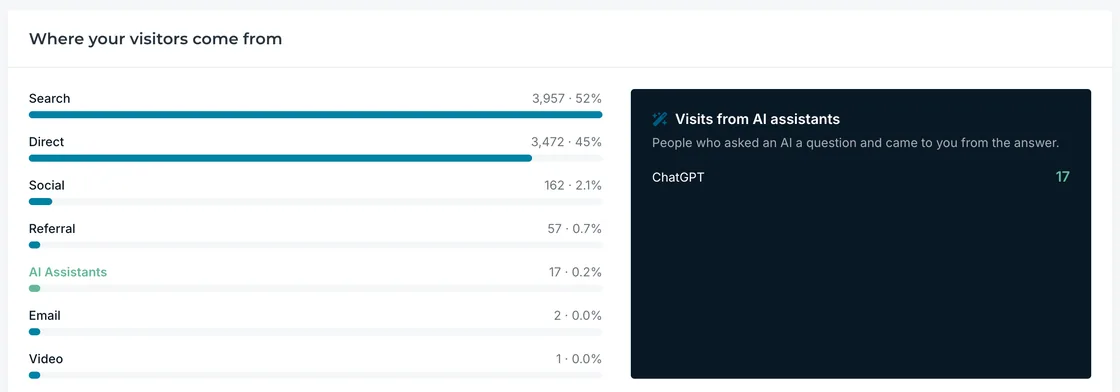
Also, once a day, DogHouse picks one true and interesting thing about your website's traffic and says it in a sentence, with the numbers behind it: visitors, the share that came from search, and how many arrived from an AI assistant. It updates once a day, not every time you refresh, so the figure you saw this morning is the figure you will see this afternoon.
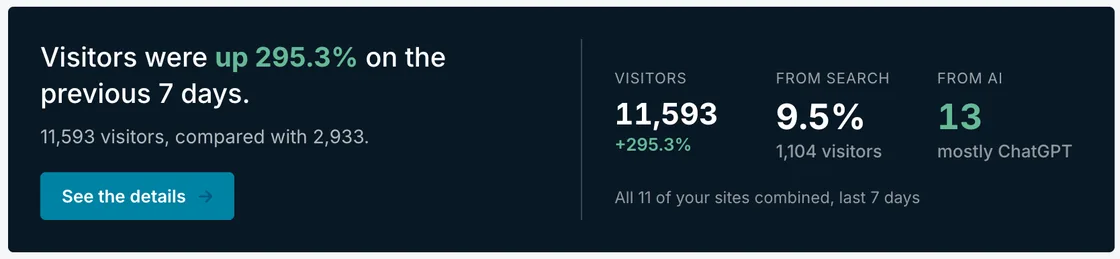
And the billing figure beside your name is everything unpaid, in one number. No second bill is hiding somewhere else.
Requests that tell you whose move it is
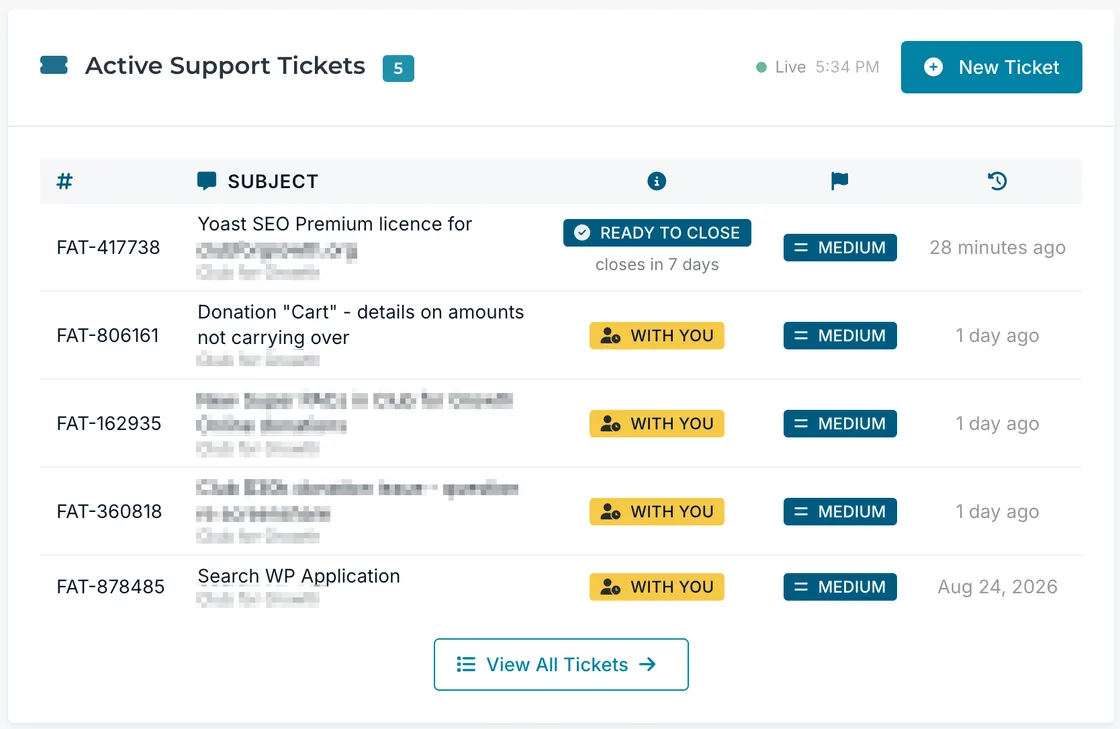
Most support portals have two states: open and closed. That tells you almost nothing. DogHouse now uses nine, and each one answers the question you actually have: whether anything is needed from you.
"Waiting on Your Response" means we are blocked on you, usually a decision, a file, or a login only you can provide. "With FatLab Team" means the ball is in our court. "Queued for Development" and "In Development Queue" mean the work has been scheduled with our development team, which runs on a longer clock than a support request. When we have to park something, "On Hold" comes with the reason in plain language and the date we will pick it back up.
When we believe a job is finished, the request moves to "Ready to Close" and tells you the date it will close. One click agrees, and saying nothing confirms it. If a request is waiting on you and goes quiet, you get reminders at seven and fourteen days before it closes at twenty-eight. A reply at any point stops the clock, and a reply after a request has closed simply reopens it. Nothing sits open forever, and nothing gets closed on you without warning.
You can still open or reply to a request in the portal, or just email us. Replies land on the same thread either way, and attachments can run up to 100MB.
Every site we look after, and the care behind it
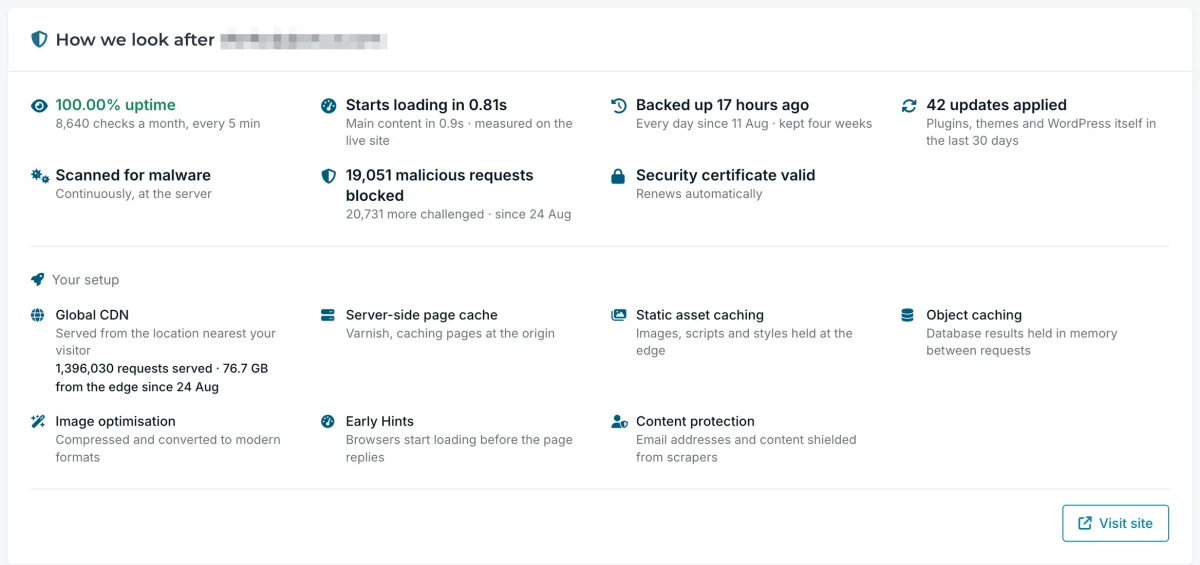
We used to call the page "Hosting," but now it's called "Websites," because that is what it is about. Each site gets a card, and the card is a record of work performed, not a list of features that happen to be switched on:
- Uptime, with the number of checks behind it. A percentage is a result. "We checked 8,640 times" is the effort behind the result.
- Updates we applied to plugins, themes, and WordPress itself, and updates we rolled back because they broke something before it reached you.
- Malware scanning, running continuously on the server.
- Threats blocked and threats challenged, counted separately. A visitor asked to prove they are human is not the same as an attack we turned away, so we do not add the two together to make a bigger number.
- Backups, including how old your most recent one is and how many unbroken days of backups you have behind it.
- Your security certificate, its status, and whether it renews automatically.
- Page speed, measured as First Contentful Paint from the live site.
- Your delivery and caching stack, laid out per site.
The uptime figure deserves its own mention. Most hosts keep that number to themselves. We put it on the card whatever it says, because if your uptime isn't what it should be, we need to know and fix it. Hiding it would only delay that.
Real analytics, built in
The old traffic number in DogHouse was a simple page counter we wrote ourselves. It counted every hit, bots included, and I was never fully comfortable standing behind it. So we retired it.
In its place, every WordPress site we host now reports through Plausible Analytics, a privacy-friendly analytics service, and DogHouse draws those figures in its own interface. You see visitors, where they came from, your most-read pages, and a separate panel for visits that arrived from AI assistants like ChatGPT, Perplexity, and Claude, broken down by assistant.
It uses no cookies and collects no personal data about your visitors, so no cookie banner is needed for it.
It does not replace Google Analytics, and you are welcome to keep using that or anything else. I wrote a separate post on why we chose Plausible and how it works inside DogHouse, including why its numbers will not match Google's.
Time, hours, and invoices
Support on the website you already have is not metered. We count it as requests handled and never bill by the hour, so the portal shows no hours and no rate against it. Development is the measured part, shown against the hours in your plan, with twelve months of history so you can see what a normal month looks like. Anything beyond your plan is agreed with you before we start, never after.
Invoices are all there with PDF downloads, and you can pay by card, ACH bank transfer, or check, with our mailing address printed right on the page. You can save payment methods, and receipts can go automatically to your bookkeeper or accounts payable inbox.
Meetings and access
You can book time with the right person on our team directly from the portal, without a form in the way. Sign-in is passwordless: you request a link and click it, so there is no DogHouse password to forget or to leak. And for organizations where several people need to see the account, we can set up limited-view contacts who see what they need and nothing more.
The rules behind the numbers
Here is the part I am proudest of, and the part that is hardest to copy. Any agency can buy a portal. What they cannot buy is a set of rules about honesty that the code itself enforces. We wrote four of them into DogHouse.
It goes quiet rather than spinning. If a site had updates rolled back but none applied, the card shows nothing about updates. "0 updates applied, 6 caught before they reached you" is technically true, sounds cheerful, and is the wrong impression. Where the honest answer is unflattering, you get no line rather than a defensive one.
An absent number is never a zero. A site that is still collecting data shows no figure. A site with a genuine zero shows a zero. Displaying both as "0" would suggest your site had no visitors when the truth is we have not finished measuring yet. DogHouse has four separate empty states for exactly this reason.
Nothing can read as a shortfall. Your site's card shows no ratios and no utilization figures. A number that can be "low" invites you to read a failure into your own website. We considered showing storage and rejected it on those grounds, because a consumption figure reads as "am I near a limit?"
No number is inflated to look better. A site's traffic never changes how carefully we handle its figures. Three visitors against last month's one is a 200 percent rise, arithmetically true and completely meaningless, so comparisons below twenty visitors are suppressed rather than dressed up.
"I would rather show a client an honest silence than a number I would have to explain away later," is how I put it to our team. "The whole point of a portal like this is trust. The moment a client catches us polishing a figure, every other number on the page stops meaning anything."
The back office: the part that runs the company
This is the part nobody outside FatLab ever sees. DogHouse does not just give clients a window into their account. It runs the entire business.
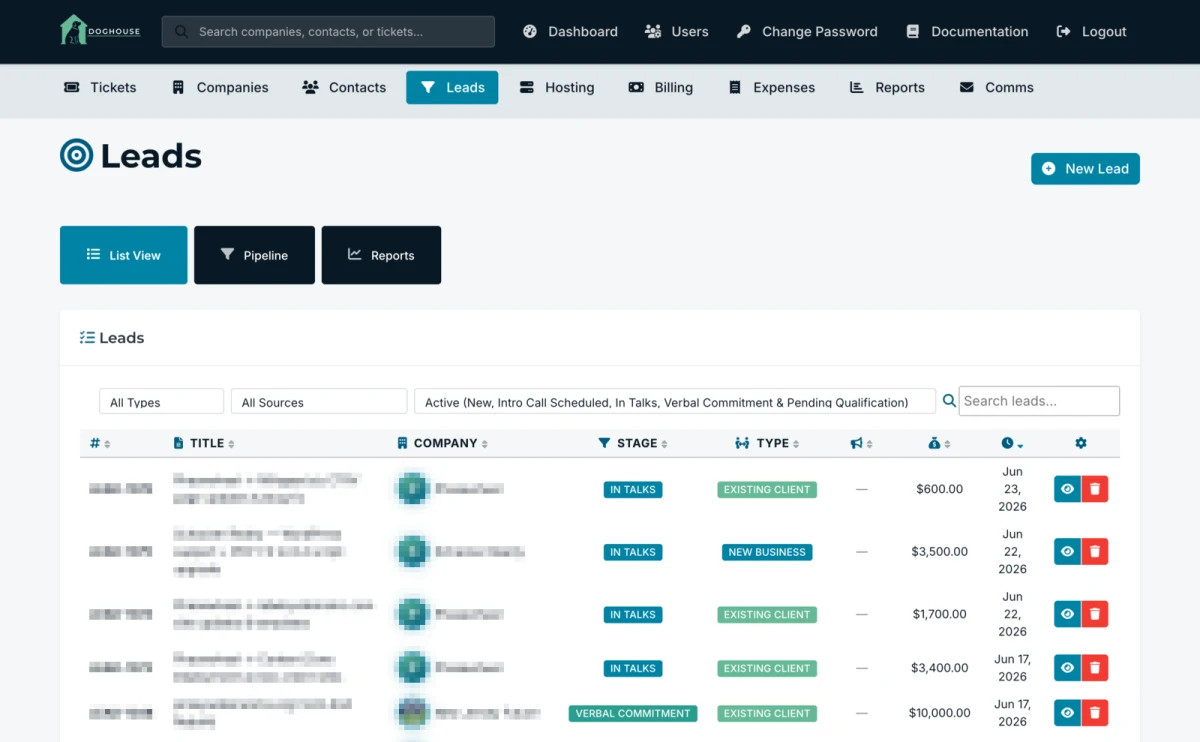
Leads and the sales pipeline
Everything starts with a lead. When a potential client reaches out, they enter our sales pipeline, a visual board where we track every prospective deal from first contact through to a signed client. We log calls and activities, set reminders so nothing slips, and run reports on where new business comes from.
Companies and contacts
Once someone becomes a client, they get a company record: their organization, their contacts, the websites we manage for them, the servers and applications those sites run on, and the documents tied to the relationship. It is the single source of truth for who everyone is and what we run for them.
The ticket system
This is the engine that probably matters most, day to day. When you email us, DogHouse automatically turns that email into a ticket, routes it, and keeps the whole conversation organized. We group related work into projects, track time against it, and see at a glance which requests are waiting on us, which are with our developers, and which are waiting on you. The same system that shows you a tidy list of your requests is, on our end, a full support desk.
Billing and financial reporting
Billing runs through DogHouse too. We generate invoices as PDFs, handle recurring billing and subscriptions through Stripe, track the specific charges and plugins tied to each client, and process payments. On top of that sits a real financial reporting layer: upcoming revenue forecasting, a twelve-month cash flow forecast, invoice aging, a revenue intelligence dashboard, and even a financial health score that grades the business from zero to one hundred on a handful of key metrics.

Hosting, email, and expenses
On the infrastructure side, DogHouse connects to our hosting platform, our uptime monitoring, and our analytics, so we can see the servers and applications we run for clients without leaving the system. Client emails go out through a templated, on-brand communication system. We even track our own company expenses in here. From a brand-new lead, to a paid invoice, to a resolved support ticket, it is all one system.
More than a year of building it for real
I can write all of this with a straight face because DogHouse isn't a demo or a side project. We have run FatLab on it every single day for more than a year.
We launched version 1.0 in the summer of 2025 and shipped more than 180 updates across the 1.x series before the 2.0 rebrand in June. Since then, we have shipped more than 130 more, and most of what you read in the client section above did not exist when this post first went up.
Some of those came from our own daily use, where we hit a rough edge and smoothed it out. A good number came from clients who took the time to tell us what was confusing or what they wished it did. We genuinely appreciate that feedback, and a lot of it is now baked into the product. Thank you.
That is the part I want to land. Software gets good by being used and refined, not by being launched. Running our actual business on DogHouse, with real money and real client work flowing through it, is what turned it from a thing we built into a thing we rely on.
Why we built our own
We could have stitched together a CRM, a help desk, a billing tool, and a hosting dashboard from four different vendors and spent our days getting them to talk to each other. Plenty of agencies do exactly that. We went the other way and built one system that does all of it, shaped around how we actually work.
I will be straight about what DogHouse is and is not. It is not a product you can buy. There is no sign-up page, no pricing tier, and no add-on. It is included with every Watch Dog plan, and it is a serious operational tool for us. Its job is to make working with FatLab clearer for you, and to keep our business running tight on our end.
If you are a client, log in and poke around. There is more in there than you probably realize, and more of it is about your website than ever before. While you are there, you can also request free two-factor authentication for your site's logins with a single support request.
If you find something that would improve DogHouse, tell us. That is how it got this far.