
Affiliate WordPress Website Support, Hosting, & Security Information
Learn more about the ongoing support available for your NPCA Affiliate website, including details on hosting, security, and maintenance to ensure your site stays secure and up-to-date.
⚠ Hot Topic Notice: Domain Ownership, DKIM & SPF Records for Blackbaud Email
New requirement: Blackbaud now asks every sending domain to publish a Domain Ownership record. This is in addition to the DKIM and SPF records many affiliates are still working through. All three are added to your DNS settings, and each one is unique to your own domain.
- Domain Ownership Record (new): A verification record that proves your domain belongs to you. NPCA national provides your unique value. Your existing DKIM key does not change.
- DKIM Records: Each affiliate needs a unique DKIM key from NPCA national. The host/domain key is:
sm._domainkey - SPF Records: We have comprehensive guidance and a video walkthrough available.
- Need Help? We offer a one-time DNS consultation for affiliates who need technical assistance. Consultations are $25 each. You must have access to your own DNS records to participate. Schedule your consultation here.
View the Domain Ownership FAQ, the DKIM Record FAQ, and the SPF Record FAQ for step-by-step instructions.
Website Support
Limited affiliate support is provided through our agreement with the NPCA. Affiliate administrators will have editorial access to the site to control content. These are WordPress websites; through our partnership with NPCA, we will keep them updated and secure. Currently, providing super admin rights or server access to affiliates is not possible.
Any support inquiries for the affiliate websites should be sent to support@fatlabwebsupport.com.
Hosting and Security
- Hosting is provided as part of our partnership with NPCA. We monitor the site's uptime and performance 24/7/365
- Backups for 30 days are maintained
- Each website is protected by an enterprise Web Application Firewall (WAF)
- We maintain all software updates for each affiliate site.

Frequently Asked Questions
What types of support for affiliates are FatLab contracted to do?
FatLab is contracted to provide essential technical support for NPCA Affiliate websites, which includes maintaining website functionality, fixing bugs, ensuring security, performing software updates, and assisting with content management tasks. We also provide guidance through tutorials and resources.
Support inquiries for affiliate websites should be sent to support@fatlabwebsupport.com.
What types of support for affiliates are NOT included?
FatLab is a technical implementation partner for NPCA and can only address technical inquiries related to affiliate WordPress websites. This includes support for website functionality, updates, and security. However, any concerns related to the migration from the old system to Blackbaud / Raiser's Edge, such as membership-related issues (lists, directory, etc.), job postings, donations, e-commerce, email tools, and similar features, fall outside of our scope. For these matters, please contact the national organization directly.
Any requests for custom features, extensive design changes, or additional functionality outside the standard website template are currently not within our scope of work.
While we do not offer personalized one-on-one support, we are eager to assist with any technical questions and will enhance our online support materials as new queries emerge.
Can I set up a consultation call with FatLab directly?
No. Personal planning meetings or calls with affiliates aren't within the scope of our current NPCA Affiliate Support. Please contact the national organization for approval for additional consultation time and then we'd be happy to schedule a call. Otherwise, we're here to clarify anything via email and provide any necessary guidance on your WordPress website.
While we do not offer personalized one-on-one support, we are eager to assist with any technical questions and will enhance our online support materials as new queries emerge.
Is Phone Support Available?
No. While we do not offer personalized one-on-one phone support as part of our current NPCA Affiliate Support, we are happy to assist with any technical questions via email. Support inquiries for affiliate websites should be sent to support@fatlabwebsupport.com.
For additional guidance, we regularly update our online support materials as new questions arise. If further assistance is required, please contact the national organization for approval to schedule a call.
What platform are the affiliate sites built on?
Like the national website, affiliate sites were transferred to WordPress in late 2023 / early 2024. The NPCA Affiliate sites run a custom theme built specifically for NPCA with a set of custom content controls and features.
How can we learn how to manage content in the new system?
We will update this page with instructional videos as we roll out the new websites. These videos will cover how to control the various kinds of content and other features of the website. View available tutorial videos below.
Can affiliates control content?
Yes. Once the site goes live we will create an account for you to sign into and control the content of the site. You will also have the ability to add and remove other editorial users to your website. View available tutorial videos below.
What donation services are supported?
General Donation Page
As of May 2024, the national organization has provided the affiliate websites with a universal donation URL where donors can choose which affiliate is to receive the funds. This is the only donation URL we have at this time, and we have been asked to launch all sites with this general donation method.
Custom Donation Pages
We understand that some affiliates have applied for custom gateways, donation URLs, and campaigns. We have not been provided with those URLs at this time. When those become available we can update your website with the relative links.
Please direct all questions regarding the status of these services, training, or account management to NPCA.
Third-Party Services
If you are using a third party service such as Stripe or PayPal to collect donations, the website will allow you to easily add a URL or donate button or form (via embed code provided by the third party).
With Stripe and some account types of PayPal we can provide you with a simple donations form that allows one time and recurring donations. Please contact us for support on this.
How is e-commerce managed?
The affiliate's sites do not provide a built-in e-commerce solution. Many affiliates use third-party services to sell merchandise.
How are event RSVP and ticket purchases handled?
This will not be a function of the website, but rather, we understand it to be a function of the Blackbaud CRM system. We do not have any further information on this. Please contact the national organization for questions regarding such features and capabilities.
How is membership managed?
This will not be a direct function of the website, but instead, we understand it to be a function of the Blackbaud CRM system. We do not have any further information on this. Please contact the national organization for questions regarding such features and capabilities.
Can affiliates install their own plugins?
Affiliates cannot directly install their own plugins. However, if an affiliate wishes to install a plugin outside of the standard NPCA affiliate group of plugins, they can contact us at support@fatlabwebsupport.com to request plugin installation.
Plugin Installation Requirements:
- One-Time Installation Fee: Installing any custom plugin requires a one-time non-refundable fee of $75, which the affiliate must pay.
- Compatibility Evaluation: Our team will evaluate the plugin to ensure it is compatible with the NPCA WordPress theme and the current collection of plugins. We will only move forward with the installation if the plugin is found to be compatible.
- License Responsibility: If the plugin requires a license, it is the affiliate's responsibility to purchase, maintain, and renew any necessary licenses.
Additionally, technical support for custom plugins is not covered under the master agreement with NPCA. Any support required due to the use of a custom plugin will be subject to separate terms and costs, which will be negotiated directly with the affiliate organization.
Can affiliates change the design?
No, that is not possible at this time, as we try to maintain a universal style and branding across all affiliate sites. However, there are certain personalized touches that can be made, such as logo and brand colors seen throughout the site. Of course, the content is 100% yours.
Can affiliates have file and database access?
We cannot give you direct server access at this time. This is to preserve the universal platform of the affiliate sites.
Can FatLab or NPCA help with DNS record changes during the site migrations?
We will do our best to help you make a smooth migration. However, only the account holder (usually the domain owner) can change DNS records. You must gain access to this account as we cannot do this for you.
Once you have confirmed access to your DNS records, we will provide detailed instructions, and if you like, you can schedule a 15-minute screen share with our team to help you make the changes.
We cannot contact your domain registrar or DNS record manager on your behalf or make the record changes without direct account access.
What are the steps to taking your site to live?
Taking Your Website Live
If you have a custom domain, you must make DNS record changes. DNS records are typically held with the domain registrar (where the domain was purchased). Someone with administrative privileges to the domain will need to make the following changes to their records:
Step 1
Email support@fatlabwebsupport.com notifying us of your intention to change your DNS records. Please provide your affiliate name and the custom domain you wish to use. Please wait for our confirmation before moving onto step 2.
Step 2
All instructions are for the base/apex domain and are in {host} -> {value} format.
We use Cloudflare Enterprise as our Firewall and CDN. Please update your DNS records as specified below to direct your site's traffic through Cloudflare, ensuring enhanced security and performance.
A Records
@ -> 162.159.137.54
@ -> 162.159.136.54
CNAME Records
www -> secure.cloudways.cloud
Please ensure these are the only A and CNAME records for @ and www.
TXT Record
Some domains require us to create an additional text record to verify domain ownership. We will notify you if this is the case, as each TXT record is unique.
Gaining Administrative Access
Once your website is live, we will provide you with editorial access to the website so you can control content and other built-in functions of the site.
As an editorial user, you can add, remove, and manage other editorial users on the site.
🏷 How to Add Your Domain Ownership Record for Blackbaud Email
What is a Domain Ownership Record?
A Domain Ownership record is a TXT record that proves to Blackbaud that your organization controls your domain. Blackbaud checks for it, confirms the domain is yours, and then verifies your email authentication settings.
Important Information:
- Your existing DKIM key does not change: If DKIM was already set up for your domain, that record stays exactly as it is
- Every domain needs its own record: There is no single record that covers NPCA and all affiliates. Your value is unique to your domain
- Contact NPCA National: You must contact the national organization to receive your unique Domain Ownership value
- FatLab does not have access to generate or retrieve these values
- All questions about Blackbaud itself must be directed to the NPCA national organization
📝 How to Add Your Domain Ownership Record
Once you have received your unique value from NPCA national, add it to your DNS settings as a TXT record:
Type: TXT
Name / Host: your domain itself, at the root. Most DNS providers want either @ or the bare domain name here
TTL: 3600 (or 1 hour)
Value: [Your unique value provided by NPCA]
The value is a long string of letters and numbers, roughly 40 characters, and looks something like:
B6376DEEC76779F4B645C201AE382B24162D86BE
Copy and paste the value. Do not retype it. Blackbaud displays it in a narrow box that cuts off the text on screen, so use the copy button next to the value rather than reading it off the page. A single wrong character will stop the record from verifying.
⏱ What Happens Next
Blackbaud checks for the record on its own. Once it is published, verification can take up to 72 hours. You do not need to tell Blackbaud you have added it, and there is nothing further for you to do while you wait.
🔍 How to Verify Your Record
You can confirm the record is live using this tool:
- MXToolbox TXT Lookup
- Enter your domain name and look for your value in the results
🆘 Need Help?
For your unique Domain Ownership value: Contact NPCA national organization
For Blackbaud questions: Contact NPCA national organization
For hands-on help adding the record: We offer a one-time DNS consultation for $25. Schedule your consultation here. You must have access to your own DNS records to participate.
📬 How to Update Your SPF Record to Include Blackbaud Email
Important:
This guide is provided to help NPCA affiliates set up their domains so that emails sent through Blackbaud are properly authorized.
- All questions about Blackbaud itself — its functions, features, or settings — must be directed to the NPCA national organization. FatLab does not have access to the Blackbaud system, and cannot answer questions about it.
- If your organization uses its own domain, we do not control or have access to your DNS records.
- Because every DNS system is different (GoDaddy, Namecheap, Squarespace, etc.), we're unable to provide one-on-one support for making these changes.
Video explanation: What are SPF records and why they matter
🚀 Scenario 1: No Existing SPF Record
If your domain doesn't have an SPF record yet, you'll need to add a new TXT record in your DNS settings.
Use these details:
Type: TXT
Name / Host: @ (or leave blank, depending on your DNS provider)
Value:
v=spf1 include:outboundmail.blackbaud.net ~all
✅ This authorizes Blackbaud to send emails on behalf of your domain.
🛠 Scenario 2: You Already Have an SPF Record
If your domain already has an SPF record, it might look like:
v=spf1 include:_spf.google.com ~all
or
v=spf1 ip4:192.0.2.10 include:spf.protection.outlook.com -all
In this case, do not create a new record. Instead, edit the existing record to include Blackbaud.
For example:
Before:
v=spf1 include:_spf.google.com ~all
After:
v=spf1 include:_spf.google.com include:outboundmail.blackbaud.net ~all
✅ Make sure include:outboundmail.blackbaud.net appears before the ~all or -all.
⚠ Only One SPF Record Allowed
You can have only one SPF TXT record per domain. Having multiple SPF records will break SPF validation and may cause email delivery issues.
🔍 How to Check Your SPF Record
Use these tools to verify your SPF record is valid and includes Blackbaud:
- MXToolbox SPF Checker
- Kitterman SPF Validator
- Or paste it into ChatGPT for a quick format review.
📝 Quick Summary
- ✅ Only one SPF record per domain
- ✅ If you don't have one, create:
v=spf1 include:outboundmail.blackbaud.net ~all - ✅ If you already have an SPF record, add
include:outboundmail.blackbaud.netto it - ✅ Always test your record.
🤝 Need Technical Help?
We offer a one-time DNS consultation for affiliates who need assistance implementing these records. Consultations are $25 each. Schedule your consultation here. You must have access to your DNS records to participate.
🎥 Video Tutorial:
Watch our step-by-step video walkthrough above, or find it in the tutorial section below.
🔐 How to Add DKIM Records for Blackbaud Email
What is DKIM?
DKIM (DomainKeys Identified Mail) is an email authentication method that adds a digital signature to your emails. This helps receiving email servers verify that the email actually came from your domain and hasn't been tampered with in transit.
Important Information:
- Each DKIM key is unique: Every NPCA affiliate organization needs their own specific DKIM key value
- Contact NPCA National: You must contact the national organization to receive your unique DKIM key
- All questions about Blackbaud itself must be directed to the NPCA national organization
- FatLab does not have access to generate or retrieve DKIM keys
📝 How to Add Your DKIM Record
Once you have received your unique DKIM key from NPCA national, add it to your DNS settings as a TXT record:
Type: TXT
Name / Host: sm._domainkey
Value: [Your unique DKIM key provided by NPCA]
The DKIM key will be a long string that starts with something like:
v=DKIM1; k=rsa; p=...
🔍 How to Verify Your DKIM Record
After adding your DKIM record, you can verify it's working correctly using these tools:
- MXToolbox DKIM Checker
- Enter your domain and selector:
sm
✅ Complete Email Authentication
For best email deliverability, make sure you have all three:
- Domain Ownership Record: Proves the domain is yours so Blackbaud can verify it
- SPF Record: Authorizes Blackbaud's servers to send email on your behalf
- DKIM Record: Adds a digital signature to verify email authenticity
Together, these records significantly improve your email deliverability and help prevent your emails from being marked as spam.
⚠ A Note on DMARC: Only One Record Allowed
Blackbaud may also show you a DMARC record to publish, at the host _dmarc. Before adding it, check whether your domain already has one.
A domain can have only one DMARC record. If you already have one, leave it alone and skip this step. Adding a second record will break DMARC for your domain, and Blackbaud's own instructions say to skip it when a policy record already exists.
You can check with MXToolbox DMARC Lookup. If nothing is returned, it is safe to add the record Blackbaud gave you.
🆘 Need Help?
For your unique DKIM key: Contact NPCA national organization
For DNS technical questions: Contact your domain registrar or DNS provider
For Blackbaud questions: Contact NPCA national organization
🤝 DNS Consultation Service for Domain Ownership, DKIM & SPF Setup
One-Time DNS Consultation Available — $25
We understand that updating DNS records can be technical and challenging. To help NPCA affiliates successfully implement their Domain Ownership, DKIM, and SPF records for Blackbaud email, we offer a one-time DNS consultation service.
The fee is $25 per consultation.
What's Included:
- 15-30 minute screen share session
- Step-by-step guidance through adding your Domain Ownership record
- Assistance with adding your DKIM record (once you have your unique key from NPCA)
- Step-by-step guidance through adding or updating your SPF record
- Help navigating your specific DNS provider's interface
- Verification that records are properly configured
Before Scheduling:
You must have:
- ✅ Administrative access to your DNS records (usually through your domain registrar)
- ✅ Your login credentials ready
- ✅ Your unique Domain Ownership value and DKIM key from NPCA national
Schedule Your Consultation:
→ Click here to schedule your DNS consultation
Important Notes:
- The consultation fee is $25
- This is a one-time service per affiliate
- We cannot make DNS changes without your direct access
- We cannot contact your domain registrar on your behalf
- The consultation is specifically for Domain Ownership, DKIM, and SPF record implementation
- Questions about Blackbaud itself should go to NPCA national
How to Work with Your NPCA Affiliate Website
Each person who needs to control content within your affiliate site should have a unique username and password. The username is typically their email address.
We will provide you with initial access, and with this, you can add and manage other editorial accounts.
How To Log Into Your Site
You can access the login screen for your affiliate website by going to /wp-admin/ so the URL would look like: https://{YOUR-DOMAIN}/wp-admin/
If you forgot your password, there is a link available on the login screen to retrieve and reset it.
How to Add Editorial Administrators to Your Site
You can add as many editorial users to your site as you like to help add, edit and maintain content throughout the site.
How to Change or Recover Your Password
Learn how to change your password or recover it if you have lost it and are locked out of your website.
Clearing the Cache
Learn how to clear the cache in WordPress to see your changes instantly. We'll guide you through simple steps to refresh your site and ensure your updates are visible to everyone.
Adding Google Analytics and Other Tracking Codes
Learn how to integrate Google Analytics tracking codes and other pixels from LinkedIn, Facebook, and more into your site.
Using Custom CSS to Customize Your Site
Learn how to add custom CSS to your website to enhance its look and feel. This guide will show you simple steps to inject your own styles.
Changing the Donation URL on Your Website
Learn how to update the Donation URL on your website to ensure it directs to the correct destination.
How to Work With Content Columns
Learn how to organize content using columns on your website. This tutorial will show you how to create and manage multiple columns effectively.
How to Update SPF Records for Blackbaud Email
Learn how to update your domain's SPF records to authorize Blackbaud email sending. This step-by-step guide shows you exactly what to add to your DNS settings.
Also available in the SPF Record FAQ section with detailed written instructions.
How to Create Pages
In this video we show you how to create new pages within your site. These same tools can be used to edit and/or add to current pages.
How to Create Articles/Blogs & Events
Blogs, articles, or news, depending on what they are called on your website, along with events, are different than Pages. They are Posts and behave a just a little differently.
How to Control the Navigation
Learn how to make modifications to your main navigation or menu.
How to Create Custom Forms
Learn how to create and control custom forms for contact purposes, events, etc.
How to Turn Off Default Banners for Posts
Learn how to easily disable default banners for posts on your NPCA Affiliate WordPress website.
NPCA Affiliate Website Capabilities & Versioning
The affiliate websites are built on WordPress and utilize a custom theme with many features and functions designed specifically for NPCA.
Current Version
- Updated theme to ensure compatibility with MU-plugin for hiding the Breeze plugin error
Special Feature Added
Rolling Out from September 23rd
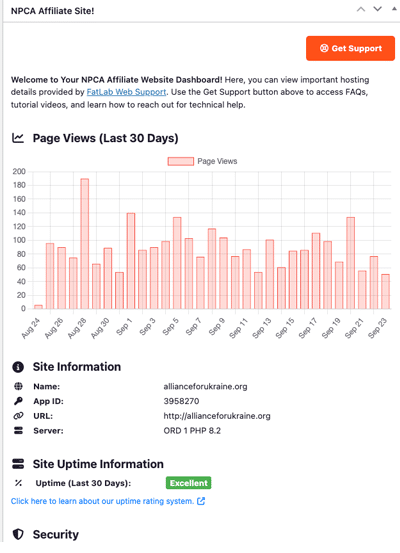
Website Status Dashboard Widget
Starting on September 23rd, we began rolling out a new dashboard widget to all sites, with full deployment expected within a week.
Key highlights include:
- Easy Access to the NPCA Support Page
- Last 30 Days Page View Graph
- Critical Site Information:
- Uptime
- Security Features
- Performance Features
- Software Updates
- Backup Information
This feature enhances site monitoring and support visibility, providing quick access to essential metrics and information.
Version History
- Patched bug in Blog/News newmodule that disturbed the total number of posts displayed in certain conditions. Bug was introduced in v.1.10.9
- Ensured 'Make post sticky' allowed users to push specific posts to the front of the Blog/News module regardless of publish date.
- Minor style cleanup through several modules.
- Fix and clean up tab module styling.
- Remove national branding colors from hero slider arrows and use a generic white/gray combo instead.
- Improved on-screen field instructions.
- Adjusted CSS padding around nav-link in main navigation to allow easier custom styling via Theme Options > Header Scripts.
- A fallback for the function introduced in v1.10.3 to provide stability.
- Suppressed the Breeze permissions notification. This is a known issue related to a performance plugin, and it does not affect the website's functionality or performance.
- Hid software upgrade nag message. All software updates are managed automatically, individual affiliates do not need to worry about those.
- Fixed issue of double header text on archive pages when default banner is turned off from posts.
- Introduced the ability to turn off the default banner on posts and post listing pages (archives). Posts include events, articles, blogs, etc.
- The events page now determines past events by the end date.
- Added ability for administrators to manage custom forms.
- Requires the Gravity Forms plugin, which is installed upon request.
- Requires Paypal or Stripe.
- Corrected order of past events to display in descending chronological order.
- Added custom donation form to theme (Gravity Forms JSON).
- Requires the Gravity Forms plugin, which is installed upon request.
- Requires Paypal or Stripe.
- Added universal forward of old SilkStart login URL.
- Fixed issue with title and caption not showing in photo gallery modals.
- Ability to introduce various forms to the site
- Default event submission form made available.
- Requires Gravity Forms plugin, installed upon request.
- Fixed order of upcoming events displayed in the footer.
- The event post category now provides paging through past events.
Initial Release Features (v1.7.0)
Post Management
- Multiple Categories of Posts: Supports various post categories such as news, blogs, etc., allowing for organized content presentation.
Events Management
- Chronological Display: Events are shown in chronological order on the website.
- Automatic Removal: Past events automatically disappear from the site once their date passes, keeping the display current without manual intervention.
Multimedia Management
- Comprehensive tools for uploading, organizing, and embedding multimedia content such as images and videos.
Page Content Control
- Content Columns: Enables the creation of multi-column layouts for rich page designs.
- Content with Media Alignment: Allows media to be aligned either to the left or right side of the text.
- Post Listings: Dynamic listing capabilities for different types of posts.
- Personnel Listings: Facilitates the listing of personnel details.
- Tabs: Supports tabbed content for organized presentation.
- Accordion: Offers accordion functionality for collapsible content sections.
Calls to Action (CTAs)
- Become a Member CTA: Dedicated feature for prompting site visitors to sign up as members.
- Donate CTA: Easy-to-use donation button for charitable contributions.
Navigation Control
- Main Menu Management: Full control over the structure and elements of the main navigation menu.
Site Management
- Editor Management: Ability to manage and assign roles to site editors.
- Tracking Scripts Integration: Supports integration of various tracking scripts.
- Social Media Integration: Easy management of social media links.
- SEO Controls: Provides detailed controls for SEO on a per-page basis.