
Caching plugins store pages on your server. Edge caching stores pages on servers around the world.
This distinction matters more than which plugin you choose. A visitor in London requesting a page from your Texas server will always be slower than that same visitor receiving the page from a server in London.
Physics wins.
Edge caching eliminates the distance problem. And for WordPress sites that don't require personalized content, it delivers performance that no plugin can match.
What Edge Caching Actually Does
Traditional CDNs cache static assets, such as images, stylesheets, and JavaScript files. When someone visits your site, these files load from nearby servers. But the HTML page itself still comes from your origin server.
Full-page edge caching goes further. It caches your entire HTML pages at edge locations around the world.
When a visitor requests a page:
- The request goes to the nearest edge server (not your origin server)
- If the page is cached at the edge, it's served immediately
- Your server never receives the request
Your WordPress server doesn't do anything. The entire page is delivered from the edge. No PHP execution. No database queries. No server processing of any kind.
The Geographic Reality

Consider a visitor in Sydney, Australia, visiting a WordPress site hosted in New York.
Without edge caching:
- Request travels ~10,000 miles to New York
- Server processes request, runs WordPress, generates page
- Response travels ~10,000 miles back to Sydney
- Round-trip latency: 200-300ms minimum, plus server processing
With edge caching:
- Request goes to Cloudflare's Sydney data center
- Cached page is served immediately
- Round-trip distance: essentially zero
- Response time: 30-50ms
This isn't theoretical. It's physics. Light traveling through fiber-optic cables travels at a finite speed. Distance creates latency that no server optimization can eliminate.
Edge caching moves your content closer to visitors. For a global audience, this is transformative.
How This Compares to Plugin Caching
| Aspect | Plugin Caching | Edge Caching |
|---|---|---|
| Where content is stored | Your server | 250+ global locations |
| Network latency | Full round-trip to server | Minimal (local delivery) |
| Server load | Reduced but not eliminated | Eliminated for cached content |
| Global performance | Limited by server location | Consistent worldwide |
| TTFB | Hundreds of milliseconds | Often under 50ms |
Plugin caching makes your server respond faster. Edge caching eliminates the need to reach your server at all.
Cloudflare APO: Edge Caching for WordPress
Cloudflare's Automatic Platform Optimization (APO) brings full-page edge caching to WordPress at $5/month.
What APO does:
- Caches entire HTML pages at Cloudflare's edge
- Uses Cloudflare Workers for WordPress-aware caching
- Automatically invalidates cache when you publish new content
- Works with standard WordPress installations
Reported results:
- 70-300% performance improvements
- TTFB reductions of 70%+ (136ms to 37ms in some tests)
- Consistent global performance
For $5/month, APO often outperforms caching plugins at $59/year. It's a different approach that addresses the fundamental bottleneck: the distance between visitors and content.
APO Limitations
APO isn't perfect for every scenario:
Logged-in users: APO only caches pages for logged-out visitors. If you run a membership site or WooCommerce store with many logged-in users, APO doesn't help them.
Dynamic personalization: Content that varies by user, location, or other factors may not cache properly.
Complex setups: Some WordPress configurations (certain plugins, non-standard permalinks) can conflict with APO.
For simple WordPress sites with mostly anonymous visitors, APO delivers exceptional value. For complex sites with logged-in functionality, you need a more sophisticated approach.
Beyond APO: Cloudflare Enterprise
Cloudflare's free and Pro tiers have limitations. The Enterprise tier removes them.
Cloudflare Enterprise includes:
- Full-page caching for logged-in users: Custom cache rules can handle authenticated content
- Dedicated SSL certificates: Not shared with other domains
- Advanced WAF: More sophisticated security rules
- DDoS protection: Higher-tier mitigation
- Priority routing: Traffic routes through less-congested paths
- 24/7 support: Actual humans who understand your configuration
The price: Enterprise plans start around $200/month directly from Cloudflare, though pricing varies by configuration.
For sites where performance and security justify the investment, Enterprise-level edge caching provides capabilities that free and Pro tiers can't match.
The Complete Caching Architecture
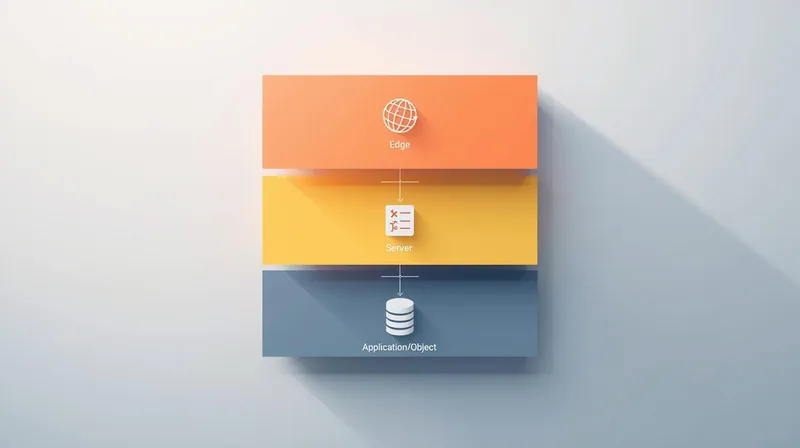
The best WordPress performance comes from layering caching appropriately:
Edge Layer (Cloudflare)
- Full-page caching for anonymous visitors
- Static asset caching for everyone
- Global delivery from 250+ data centers
Server Layer (Varnish)
- Catches requests that reach your server
- Serves cached content without WordPress loading
- Handles edge cache misses efficiently
Application Layer (Redis)
- Object caching for database queries
- Speeds up page generation for logged-in users
- Reduces database load for dynamic content
Each layer handles what it does best. Edge caching delivers pages globally. Server caching catches what the edge misses. Object caching speeds up dynamic generation.
Plugins fit somewhere in the application layer, but they can't replicate what the edge and server layers provide.
When Edge Caching Makes the Most Sense
Brochure Sites and Blogs
Sites that change occasionally and serve mostly anonymous visitors are perfect for edge caching.
At FatLab, this is our default approach for brochure sites. We enable Cloudflare Enterprise full-page caching, and the server basically stays idle. Visitors worldwide get sub-500ms load times because they're receiving content from nearby data centers.
The server doesn't have to do any rendering to render the page. It rendered it once. Cloudflare serves it forever until the content changes.
Marketing Sites with Traffic Spikes
If your site might get featured in media coverage or go viral, edge caching handles the spike gracefully.
Plugin caching still requires your server to process every request (even cached ones trigger PHP). Under extreme load, PHP processes can max out.
Edge caching means the spike never reaches your server. Cloudflare's infrastructure handles millions of concurrent users without breaking a sweat.
Global Audiences
If your visitors come from multiple continents, edge caching dramatically improves the experience for everyone who isn't near your server.
A WordPress site hosted in one location serves that location well. Everywhere else experiences latency. Edge caching makes geography irrelevant.
When Edge Caching Has Limitations
Membership Sites
If most of your traffic is logged-in users, standard edge caching (including Cloudflare APO) doesn't help them.
You need either:
- Enterprise-level configuration with custom cache rules for authenticated content
- Server-level caching (Varnish) for authenticated pages
- Strong object caching (Redis) to speed up dynamic page generation
Frequently Updating Sites
If you publish content multiple times daily, aggressive edge caching can cause freshness issues.
For example, we work with AIER (American Institute for Economic Research), which publishes economic research multiple times a day. Full edge caching would mean visitors see stale content until caches clear.
Instead, we use a hybrid approach: edge caching for static resources, server-level caching with short TTLs for frequently changing pages, and strategic cache invalidation when new content is published.
E-commerce with Personalization
Shopping carts, recently viewed products, and user-specific recommendations don't cache well at the edge.
WooCommerce sites benefit from edge caching for product pages (anonymous browsing), but need server-level and object caching for the shopping experience itself.
Making Edge Caching Work
Basic Setup: Cloudflare APO
- Add your site to Cloudflare (a free account works)
- Enable APO ($5/month add-on)
- Install the Cloudflare WordPress plugin
- Configure APO in the plugin settings
- Test with incognito browsing from various locations
For most WordPress sites, this delivers significant improvement with minimal effort.
Advanced Setup: Full CDN Configuration
- Use Cloudflare Pro or higher for more control
- Create page rules for caching HTML
- Configure cache headers from WordPress
- Set up cache invalidation on publish
- Test thoroughly across user states and content types
This requires more technical knowledge but offers finer control over what caches and for how long.
Professional Setup: Enterprise CDN
For sites where performance directly impacts revenue:
- Cloudflare Enterprise (directly or through hosting provider)
- Custom cache configurations per content type
- Logged-in user caching where appropriate
- WAF and security rules
- Ongoing monitoring and optimization
At FatLab, we include Cloudflare Enterprise on all hosted sites. The configuration is handled at the infrastructure level, optimized for each site's specific needs.
The Strategic Decision
If you're evaluating caching solutions, the real question isn't "which plugin is best?" It's "What caching architecture makes sense?"
Plugin caching is appropriate when:
- You're on shared hosting without server-level options
- You need quick improvements without infrastructure changes
- Your audience is geographically concentrated near your server
Edge caching should be prioritized when:
- You have a global audience
- Your site has mostly anonymous visitors
- You want performance that scales without server upgrades
- You're willing to spend $5/month (APO) or invest in better hosting
Layered caching delivers the best results when:
- You have significant logged-in traffic AND anonymous traffic
- Your site has varied content types with different caching needs
- Performance is business-critical
- You can invest in proper infrastructure
The Bottom Line
Edge caching delivers pages from servers near your visitors. Plugin caching makes your server respond faster to distant requests.
When you understand this distinction, the performance ceiling becomes clear. Plugins can only improve how fast your server responds. Edge caching eliminates the need to reach your server at all.
Cloudflare APO at $5/month often beats caching plugins at $59/year because it addresses a more fundamental bottleneck: the distance between your visitors and your content.
For WordPress sites with global audiences and mostly anonymous visitors, edge caching isn't an optimization. It's the foundation of a proper performance architecture.