
If you're searching for the best WordPress maintenance services, you've probably noticed something frustrating. Every provider uses similar language, promises similar results, and makes it difficult to understand what you're actually getting for your money.
The reality is that WordPress maintenance services can mean different things to different providers. Some are hosting companies that handle updates. Some are maintenance services that work on sites they don't host. And a few, including us, take responsibility for the entire stack from server to support ticket.
Understanding these differences is the key to choosing the best WordPress maintenance services for your situation. This comparison will help you evaluate providers based on what actually matters, not marketing language. For background on what WordPress care plans typically include and who actually needs one, start with our comprehensive guide. If you're still figuring out whether a care plan differs from a maintenance plan, we break down the care plan vs. maintenance plan distinction.
WordPress Maintenance Services: What Are You Actually Buying?
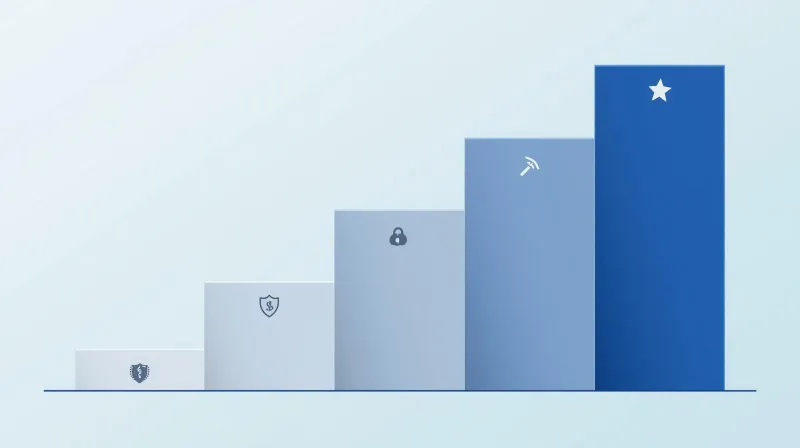
Before comparing specific providers, it helps to understand the spectrum of WordPress maintenance services available.
Level 1: Hosting Companies
At the foundation, hosting companies manage servers. When they advertise "99.99% uptime," they're talking about their network infrastructure, not your website. Your site could be broken, slow, or riddled with plugin conflicts, and as long as the server is running, they've met their promise.
Companies at this level: Bluehost, GoDaddy, and basic shared hosting providers.
Level 2: Managed Hosting
Managed hosting adds a layer of WordPress-specific services, including automatic updates, scheduled backups, and basic security scanning. The infrastructure is optimized for WordPress, and you get more than raw server access.
The catch is that "managed" typically means they manage the software, not your website. When something goes wrong, like a plugin conflict, a broken form, or a layout issue, you'll often hear "that's a WordPress issue, not a hosting issue."
Companies at this level: WP Engine, Kinsta, Pantheon.
Level 3: Maintenance-Only Services
Maintenance-only WordPress services focus on the WordPress layer: plugin and theme updates, security monitoring, and backup management. They work on sites regardless of where they're hosted.
The trade-off is that they don't control the infrastructure. When there's a server issue, they have to call your host, which means you're back to coordinating between vendors and hearing "that's not our problem."
Companies at this level: GoWP, WP Buffs (lower tiers), many freelancers.
Level 4: Full-Stack Care
Full-stack WordPress maintenance services mean one provider takes responsibility for everything: hosting, optimization, security, maintenance, and support. When something goes wrong, there's no finger-pointing, no phone tag between vendors, no "call your host" or "call your developer."
Companies at this level: FatLab, SiteCare (higher tiers), some boutique providers.
The question isn't which level is "best." It's which level matches your needs. A simple brochure site might do fine with Level 2. A mission-critical site that processes donations, manages members, or handles media cycles likely needs Level 3 or 4. For help determining whether your organization needs a care plan at all, see our guide on what WordPress care plans include.
Best WordPress Maintenance Services Compared
Here's how the major WordPress maintenance services compare. We've included pricing, key features, and honest assessments of what each does well.
GoWP
Pricing: $39-$99/month (maintenance), $1,299/month (dedicated team members)
What's Included:
- $39/month: WordPress and plugin updates, daily backups, security scans, malware cleanup
- $99/month: Adds unlimited content edits, white-label help desk
Best For: Agencies managing multiple client sites who need white-label maintenance they can resell.
Strengths:
- Visual Validator takes automated screenshots before and after updates, flagging visual differences before clients notice
- Strong white-label program with full branding control
- Affordable entry point for basic maintenance
Limitations:
- Maintenance-only (you need separate hosting)
- Support is maintenance-focused, not comprehensive website troubleshooting
- Higher tiers required for content edits
Our Take: GoWP does white-label maintenance well. If you're an agency that needs reliable update management without building that infrastructure yourself, it's a solid choice. But it's maintenance, not full care. When your client's site has a problem that isn't due to an update, you're back to coordinating with their host.
WP Buffs
Pricing: $89-$359/month
What's Included:
- Maintain ($89): Weekly updates, 4x daily backups, 24/7 uptime monitoring
- Protect ($179): Adds unlimited website edits, security optimization
- Perform ($239): Adds speed optimization, malware removal, e-commerce management
- Custom ($359): Adds staging-tested updates, custom functionality monitoring
Best For: Small businesses and entrepreneurs who want hands-off WordPress management.
Strengths:
- 24/7 monitoring and support
- Unlimited website edits on higher tiers (within reason)
- Premium plugins included (WP Rocket, iThemes Security Pro, Smush Pro) on higher plans
- Genuine round-the-clock availability
Limitations:
- Maintenance-only (hosting not included)
- Staging-tested updates only on the highest tier
- Support is reactive, not proactive
Our Take: WP Buffs is one of the more well-rounded WordPress maintenance services available. The 24/7 support and included premium plugins add real value. But like GoWP, they're maintaining sites they don't host, so when there's a server-level issue, you're coordinating with vendors.
SiteCare
Pricing: $120-$2,190/month
What's Included:
- Silver ($120): Daily backups, uptime monitoring, malware scanning, automatic updates
- Gold ($435): Adds hosting, staging-tested updates, dedicated account manager, five quick fixes/month
- Diamond ($2,190): Adds 10-hour flex pack, strategy sessions, after-hours support
Best For: Larger organizations, enterprises, and compliance-focused nonprofits.
Strengths:
- SOC II certified (matters for organizations with compliance requirements)
- Dedicated account managers on all plans
- Good nonprofit discount (20%)
- Hosting included on Gold tier and above
Limitations:
- Significant price jump between tiers
- Entry tier doesn't include hosting
- Diamond pricing puts it out of reach for most small organizations
Our Take: SiteCare is a legitimate option for enterprises and compliance-focused organizations where SOC 2 certification is required. The dedicated account manager model means you work with someone who knows your site. But the pricing structure means the full-stack experience requires a significant investment.
SkyrocketWP
Pricing: $49-$79/month, $150/hour for development
What's Included:
- Basic ($49): Updates, security monitoring, daily backups, Kinsta hosting
- Better ($79): Adds premium features, lead capture widget
Best For: Budget-conscious sites seeking affordable hosting and maintenance bundled.
Strengths:
- Kinsta hosting included at all tiers (legitimate value)
- Money-back page load speed guarantee
- No long-term contracts
- Good value for the price point
Limitations:
- Limited development support ($150/hour when needed)
- Smaller team means less 24/7 coverage
- Fewer features than higher-priced competitors
Our Take: SkyrocketWP offers genuine value at the entry level. Bundling Kinsta hosting with maintenance at $49/month is hard to beat for simple sites. The trade-off is that you're getting less support infrastructure than larger WordPress maintenance services. For a basic site that doesn't need much ongoing attention, it's a reasonable choice.
FatLab Web Support
Pricing: $99-$599/month (standard), 20% nonprofit discount available
What's Included:
- Starter ($99): Premium hosting, Cloudflare Enterprise CDN/WAF, 24/7 monitoring, weekly updates, daily backups, malware scanning, full troubleshooting support
- Professional ($199): Adds 1 hour monthly development time
- Business ($349): Adds 3 hours monthly development time, dedicated contact, priority handling
- Enterprise ($599): Adds 8 hours monthly development time, first-priority queue, strategy calls
Best For: Organizations that want a single point of contact for all website-related tasks, particularly nonprofits, associations, and mission-critical sites.
Strengths:
- Full-stack control: hosting, CDN, WAF, maintenance, and support under one roof
- Single point of contact, with no "call your host" or "call your developer"
- We know your site, your organization, your history
- Development hours included at higher tiers (not just a la carte)
- 20% automatic nonprofit discount
- Root-level access means we can fix anything, fast
Limitations:
- Requires migrating to our hosting (we can't maintain sites we don't host)
- Higher starting price than maintenance-only services
- Not the right fit for simple sites that rarely need attention
Our Take: We built FatLab because we got tired of the finger-pointing. When a client has a problem, we want to fix it, not tell them to call someone else. The trade-off is that you have to use our hosting, and you'll pay more than for maintenance-only services. But if you want one partner who takes full responsibility, that's what we offer.
Red Flags When Evaluating WordPress Maintenance Services

After years of onboarding clients from other providers, we've seen patterns in what goes wrong. Here's what to watch for when evaluating any WordPress maintenance services. For a detailed evaluation framework, use our WordPress maintenance checklist to verify what your provider should be doing.
Monthly-Only Updates
If a provider updates WordPress and plugins only once a month, that's 12 updates per year, compared to the 52 (weekly) or more that security requires. When a critical security patch is released, you shouldn't be waiting weeks for it to be applied.
What to ask: How often do you apply updates? What's your process for critical security patches?
"Use Our Control Panel."
When a provider's response to most issues is "you can do that in your control panel," they're managing infrastructure, not your website. You shouldn't need to learn a control panel to get support.
What to ask: What happens when I have an issue? Who handles it, and what's the escalation path?
Tiered Support Systems
Large hosts often use tiered support: Level 1 reads scripts, Level 2 has some technical knowledge, and Level 3 might actually solve your problem. This system is designed to handle volume, not to know your site.
What to ask: Will I work with the same person or team over time? Do you have history on my specific site?
Low-Dollar Plans
If you're paying $5-25/month for WordPress maintenance, the economics don't support anything beyond basic automation. At that price point, you're getting volume-focused service where you're one of thousands. That's fine if your needs are basic, but don't expect personalized attention.
What to ask: How many sites does your team manage? What's included if something goes wrong?
Update Counts Climbing
Log in to your WordPress dashboard. If the update counter keeps climbing despite having a maintenance plan, nobody's actually looking at your site. This is more common than you'd think.
What to ask: Can I see a maintenance report for my site? What was done last month?
Blame-Shifting
"That's a WordPress issue, not a hosting issue." "That's a theme problem; contact the developer." "That's a plugin conflict; you'll need to hire someone." If you hear these phrases regularly, you have a vendor, not a partner.
What to ask: What happens when there's a problem you can't immediately solve? How do you handle issues that span hosting and WordPress?
How to Choose the Best WordPress Maintenance Services

The right provider depends on your situation. Here's how to think through the decision:
Choose Managed Hosting (Level 2) If:
- Your site is relatively simple (brochure, basic blog)
- You have internal technical resources for WordPress issues
- Your budget is under $50/month
- Downtime is inconvenient but not catastrophic
- You're comfortable coordinating with a separate developer when needed
Good options: WP Engine, Kinsta, or SkyrocketWP at the low end.
Choose Maintenance-Only Services (Level 3) If:
- You're an agency managing client sites (see our guide on WordPress care plans for agencies for the build vs. buy vs. partner decision)
- You're happy with your current hosting and just need maintenance
- Your budget is $40-$100/month
- You have a developer relationship for anything beyond maintenance
- Your sites are active but not mission-critical
Good options: GoWP, WP Buffs Maintain tier.
Choose Full-Stack WordPress Maintenance Services (Level 4) If:
- Your website is mission-critical (handles donations, members, sales)
- You want one phone number to call for any website issue
- You don't have internal technical resources
- Downtime or security issues would be genuinely damaging
- You value a long-term relationship over the cheapest option
Good options: FatLab, SiteCare (Gold tier or above).
Choose Something Simpler If:
- You're a solo consultant with a basic brochure site
- You update content once a week or less
- Your site has no e-commerce, member areas, or complex functionality
- You're just getting started and need to minimize costs
Good options: Squarespace, Wix, or basic managed WordPress hosting. Not every organization needs WordPress, and not every WordPress site needs a care plan.
The Bottom Line on WordPress Maintenance Services

"Best" is relative. The best WordPress maintenance services are the ones that match your actual needs, not the cheapest option, not the most expensive option, and not the one with the best marketing.
If your site is simple and you have technical resources, managed hosting is probably sufficient. If you need maintenance but have a good hosting setup, a maintenance-only service works. If you want one partner who takes full responsibility for everything, that's a full-stack provider.
We're obviously biased toward the full-stack model, since that's how we built FatLab. But we've also told plenty of prospects that they don't need what we offer. The goal isn't to sell a care plan to everyone. It's to help you find the right fit.
If you're evaluating WordPress maintenance services and want to understand what comprehensive care actually looks like, we're happy to talk through your situation. No sales pitch, just an honest conversation about what you need.
Looking for specific pricing guidance? See our detailed breakdown of WordPress maintenance costs to understand what to budget based on your organization type.
Ready to see what full-stack WordPress maintenance looks like? Explore our maintenance plans or reach out for a conversation about your specific situation.